Showing posts with label bios. Show all posts
Showing posts with label bios. Show all posts
Friday, December 9, 2016
how can update dell Motherboard bios
how can update dell Motherboard bios
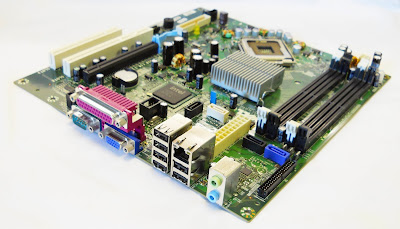
Upgrading Dell laptop or Desktop motherboard bios is very important for your PC .How can update Dell motherboard bios .Follow the next steps to update Dell Motherboard Bios .
how can update dell laptop bios
The Main purpose of upgrading Dell Laptop Bios
BIOS update Means A Basic Input/Output System and it is a software utility that updates the programming of the most basic hardware in your laptop. A BIOS update can often fix problems and/or add features to the computers BIOS.
If you are not experiencing problems on your computer and are not aware of any additional features in the BIOS that are needed, then you may not need to perform the update. You can preview the release notes for the specific update to determine whether it will benefit you.
Update Dell Motherboard bios Tips
Very important note : Dell portable systems must have the battery installed and also be running on A/C power prior to updating the BIOS.
- Go to Dell support page from here "Dell Support Page"
- Enter your system service tag number OR navigate to the specific model of computer you have. (As an alternative, you may click on Drivers & Downloads in the Popular Support Tools, then enter your system service tag or choose your system. If you do this go on to Step 4.)
- Click on the Drivers & Downloads tab.
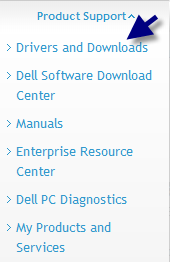
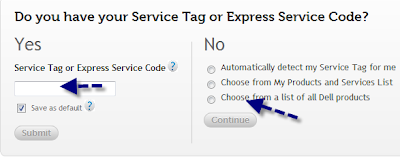
- In the pull-down menus, choose your computers Operating System and under Category, choose BIOS.
- Scroll down the list of available drivers until BIOS is visible.
- Click the arrow on the left to Expand the category and show available BIOS updates.
- Click on the most recent version of the BIOS.
- You may install the latest version of the BIOS no matter what previous version you have installed. They do not need to be installed in order as each new version includes changes from all previous versions.
- Click Download File to begin the download process.
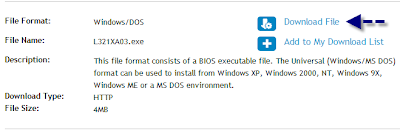
- When the file download window appears, click Run.
- Follow the on-screen instructions to complete the installation.
- We will put all laptop bios update software here in separate articles .
- Please feel free to contact me if you have any Dell laptop bios update problem ,fill this form "Contact US " or leave a comment .
- If you like this article , please share it with your friends .
- For more Information , please visit this page "Dell Help " .
- I hope to enjoy with this article "how can update dell Motherboard bios "
Go to link download

Thursday, December 1, 2016
Sony Vaio Laptop Bios Password Removal
Sony Vaio Laptop Bios Password Removal
Sony Vaio Laptop Bios Password Removal
Sony Vaio Laptop Bios Password Removal - How to delete or remove bios password sony vaio laptop ? There are 3 ways to reset or remove the bios password:
Utilize the Password Jumper
 |
| Sony Vaio Laptop Bios Password Removal |
Step 2: Find the BIOS jumper. There are many jumpers on the motherboard, so make sure that you are spotting the right one. Allude to your motherboards documentation to twofold check. The jumper covers two of the three sticks that control the BIOS secret word.
Step 3: Move the jumper. To reset the BIOS watchword, you will need to move the jumper that is covering two of the three pins. On most frameworks, moving the jumper in excess of one pin will transform it. For instance if the jumper is covering sticks 1 & 2, move it so it is covering sticks 2 & 3.
Step 4: Turn the machine on. In the wake of booting, the BIOS watchword ought to be cleared. Turn the machine once more off and supplant the jumper to its unique position. Supplant the case and the machine is prepared to be utilized once more.
Utilize an indirect access watchword.
View the following video before using the steps in this article.
Video Overview
View the following video before using the steps in this article.
Evacuating the CMOS battery
- Open the machine. This technique just takes a shot at desktop machines. Verify that the machine is turned off. Expel the case from your machine with the goal that you can get to the motherboard. Unplug force link from the again of the machine with the goal that no force is arriving at the desktop.
- Make certain that you ground yourself before touching anything inside your machine, else you may short a part.
- Place the CMOS battery. The CMOS battery is round and silver, much like a watch battery. Painstakingly expel it from its lodging. Hold up for 5-10 minutes so that the greater part of the force put away in the capacitors on the motherboard can release.
- Replace the battery. The majority of the BIOS settings will be reset whenever that you turn the machine on. You will need to reset the time and date in the BIOS setup menu.
Sony Vaio Laptop Bios Password Removal
Go to link download
Sunday, November 6, 2016
Drive Lenovo Serie G475 G575 Notebook Full Downgrade de Bios ou Upgrade 41CN21WW V1 07
Drive Lenovo Serie G475 G575 Notebook Full Downgrade de Bios ou Upgrade 41CN21WW V1 07
  |
| Notebook Lenovo G475 |
Site:.Lenovo G475 link Fabricante
Drivers Link Alternativo
Drive Lenovo Serie G475,G575 - Notebook - Full + Downgrade de Bios ou Upgrade - 41CN21WW(V1.07)
Go to link download
Friday, October 14, 2016
Dell OptiPlex 755 bios update and windows drivers download
Dell OptiPlex 755 bios update and windows drivers download

Do you have Dell OptiPlex 755 desktop computer .Do you want to upgrade Dell OptiPlex 755 bios .Here you can download Dell OptiPlex 755 bios and drivers .
Dell OptiPlex 755 desktop review and Technical details

Dell OptiPlex 755 desktop have a great technical specifications :
Dell OptiPlex 755 Mini-Tower slots :2 full height PCI ,(H: 4.2" X L: 11") ,1 PCIe x16 full height graphics,(H: 4.2" X L: 9"), 1 PCIe x1 full height,(H: 4.2" X L: 9") ,Power Supply 305 W
305W Dell OptiPlex 755 Desktop slots : 2 low-profile PCI ,(H: 2.5" X L: 6.6"),1 low-profile PCIe x16 graphics (H: 2.5" X L: 6.6"),Optional Riser converts the PCIe and PCI to either 1 PCIe and 1 PCI or 2 PCI - variable height (H: 4.2" X L: 6.9") , Power Supply 280 w
Network Interface - Intel® 82566DM Gigabit Ethernet LAN solution 10/100/1000 with Remote Wake Up, PXE support and Intel Active Management Technology support
I/O Ports
1: - Stereo in, stereo out (back) & stereo out (front), headphone
2: - RJ-45 network port
3: - 9 USB 2.0 ports, 2 front, 6 back & 1 internal (USFF - 7 USB 2.0 ports, 2 front & 5 back)
4: - 1 VGA Port (USFF 1 DVI port)
5: - 1 parallel port
6: - 1 serial port
Dell OptiPlex 755 Technical Guide Download
Download from Hulkload Server
Download From Mediafire Server
How to update Dell OptiPlex 755 desktop bios
To update Dell OptiPlex 755 bios ,please follow this tips :
- Download Dell OptiPlex 755 bios update from the link below .
- Run Dell OptiPlex 755 bios EXE file .
- Follow Dell OptiPlex 755 bios update instructions shown in the software window .
- Computer will require a restart .
- Now your Dell OptiPlex 755 desktop bios is up to date .
Download Dell OptiPlex 755 bios update software

Description : Dell Dell OptiPlex 755 Bios Update
You can choose one of this Download links
Dell Optiplex 755 System BIOS version A22 (Release Time 1/4/2013)
Download from Hulkload Server
Download From Mediafire Server
Dell Optiplex 755 System BIOS version A19 (Release Time 30/6/2011)
Download from Hulkload Server
Download From Mediafire Server
Download Dell OptiPlex 755 Windows Drivers
In the case of you need download and update your Dell OptiPlex 755 windows drivers ,please visit the following download links and choose your system and download drivers directly .

Then

Just click in operation system and choose your system drivers from here
Dell OptiPlex 755 windows vista 32 bit drivers
Dell OptiPlex 755 windows vista 64bit drivers
Dell OptiPlex 755 windows xp drivers
Go to link download
Tuesday, September 13, 2016
Dell Inspiron 15 N5040 laptop bios and drivers update
Dell Inspiron 15 N5040 laptop bios and drivers update

How to update Dell Inspiron 15 N5040 laptop bios .Here is the solution of updating your laptop bios and windows 7 or any supported operation system .Upgrade your Dell Inspiron 15 N5040 bios and drivers now.
Dell Inspiron 15 N5040 Laptop Review and Technical details


- Inspiron 15 N5040 have Mobile Intel 5 series express chipset HM57
- Dell Inspiron 15 N5040 have 15.6 HD display .
- Tray-load DVD+/-RW .
- 2 Strong speakers each one 2 watt .
- Li-Ion Battery with 6 cell .
- 0.3MP Digital Web Camera with built-in analogue microphone.
- Wifi and Bluetooth .
- HDMI ports,USB 2 ports ,Memory card reader ,....., etc .
How to update Dell Inspiron 15 N5040 laptop bios
Follow the next tips to upgrade your Dell Inspiron 15 N5040 Bios and drivers .- Download Dell Inspiron 15 N5040 Bios update software from the link below .
- Run Dell Inspiron 15 N5040 Bios update EXE file .
- Follow Dell Inspiron 15 N5040 Bios update window instructions .
- Restart your laptop .
- Congratulation your Dell laptop bios now updated
Download Dell Inspiron 15 N5040 Bios update software
Description : Dell Inspiron 15 N5040 Bios Update
You can choose one of this Download links
Dell Inspiron 15 N5040 System BIOS, A05 (Newer Update 26-6-2012)
Download From Hulkload Server
Download From Mediafire Server
Dell Inspiron 15 N5040 System BIOS, A03 (Older 25-8-2011)
Download From Hulkload Server
Download From Mediafire Server
Download Dell Inspiron 15 N5040 Windows Drivers
In case of need Dell Inspiron 15 N5040 Drivers ,Visit the links below to download and update your laptop drivers directly .Choose your laptop operation system 32bit or 64 bit and download drivers , please see the next pictures .


Just click in operation system and choose your system drivers from here
Dell Inspiron 15 N5040 Windows 7 32bit Drivers
Dell Inspiron 15 N5040 Windows 7 64bit Drivers
Dell Inspiron 15 N5040 Windows 8 64bit Drivers
Dell Inspiron 15 N5040 ubuntu 10.10 Drivers
- Please if You have a question ,please contact me or leave a comment
- Please if you like this article , please share it with your friends .
- You can read this article , it will be helpful for you "how can update dell Motherboard bios
- You can subscribe to our Facebook page from here "Dell laptop Bios Update"
- I hope that this article "Dell Inspiron 15 N5040 laptop bios and drivers update" was helpful for you .how can update dell Motherboard bios
Go to link download
Sunday, September 11, 2016
Dell Inspiron 518 Desktop bios update with windows drivers
Dell Inspiron 518 Desktop bios update with windows drivers

Update The Inspiron 518 desktop PC bios .Get the latest updates for The Inspiron 518 desktop drivers .Learn how to update your PC bios in less than three minutes .
The Inspiron 518 desktop review


The Inspiron 518 desktop is the family-friendly PC with advanced technologies .Expandable performance in a stylish black-and-chrome design .Media tray for connecting portable USB devices .Gigabit Ethernet and Optional high-definition multimedia interface (HDMI) and optional Blue-ray Disc drive
Inspiron 518 Technical Details

- Optical Drive : DVD +/- RW options available
- Sound Card : Integrated Intel® 7.1 channel High Definition Audio
- Communications : Integrated 10/100/1000 Ethernet LAN on system board andOptional Internal Wireless-N
- Ports : USB 2.0 Ports ,Eight: 2 front, 4 back, 2 top,Front & Back AV Ports ,Front: Microphone (1) and Headphone (1) ,Back: line-in, line-out, microphone, rear surround, side surround
- Slots : PCI: 1 Slot ,PCIe x1: 2 Slots ,Back: line-in, line-out, microphone, rear surround, side surround
How to update The Inspiron 518 desktop bios
Upgrading The Inspiron 518 desktop is very simple .Follow this tips and you will update your PC in a few minutes .- First make sure that your PC is The Inspiron 518 desktop .
- Download the bios update exe file from the link below .
- Run The Inspiron 518 desktop bios update .
- Follow the update window instructions .
- PC will restart to perform the update process .
- Now your The Inspiron 518 desktop bios is up to date .
Download The Inspiron 518 desktop bios update

Description : Dell Inspiron 518 System BIOS V 1.0.8
Download From HulkLoad Server
Download From Mediafire Server
Inspiron 518 Desktop windows vista drivers
You can download Inspiron 518 Desktop windows vista 32 bit or 64 bit drivers from Dell download center with direct download , just click download driver .Please see the following pictures


Inspiron 518 Desktop windows vista drivers download page
Inspiron 518 Desktop Drivers
Feel free to contact me from here "Contact US" or you can leave a comment in this article , also you can join to our Facebook page .Please if you like this article "Dell Inspiron 518 Desktop bios update with windows drivers", please share it with your friends .
Go to link download
Sunday, August 14, 2016
Compaq Bios 2 14 Rev A1
Compaq Bios 2 14 Rev A1
Driver detals compaq bios 2 14 rev a1 for Windows. Its safe, passed Norton scan!
Info:
File name: compaqbios214reva1.zip
Driver version: 2.3.6
Size: 12 815 KB
OS: Win XP, Win Vista, Windows 7
Source: search engine
Go to link download
Subscribe to:
Posts (Atom)