Showing posts with label premium. Show all posts
Showing posts with label premium. Show all posts
Sunday, November 20, 2016
Download Best Free premium Templates For blogger
Download Best Free premium Templates For blogger

If you need the best collection of blogger templates so then this post is specially published for you. You finding the best, clean and fresh and premium templates for blogger blogs is the hardest and never ending job. Since I am using blogger for blogging, I search mostly premium and well-coded and also seo (Search Engine optimization) by default and user friendly in design.
You can easily download it from kutebkhana.
How can you download these templates?
All downloading and demo links are given in below details of every template. When you click on these links the new tab will be open and all templates downloading from mediafire.com just in one click.
Azsands beautiful blogger template:
This template is totally a fresh and clean one. This template is designed by Azmind.com. This template has space for buysellads.com as default.

Live Demo | Download
MONOP Blogger Template:
This is one of the best blogger templates and this is fully optimized by Mohammad Mustafa Ahmedzai founder of mybloggertricks.com. These templates have a good header and space for Google adsense. Grab this templates just click on download and download it from MBT.

Live Demo | Download
Mash 2 Blogger Template:
Mash 2 is the second copy of Mashable blogger template. It is also a great template in design, menus, and layout and with other widgets. This template is the one which I am using for myself on this blog. I will keep it on my blog for an extended time. It has all required features.

Live Demo | Download
How to install a blogger template?
- Go to blogger dashboard click on templates.
- Click on backup/restore your templates.
- Then click on Browse button after choosing the file click on upload.
Note:
Blogger template always in .XML form if you have .zip file so first extract it.
Go to link download

Thursday, November 10, 2016
Sony Vaio VPCEB45FG drivers For Windows 7 Home Premium 64Bit
Sony Vaio VPCEB45FG drivers For Windows 7 Home Premium 64Bit
Download Sony Vaio VPCEB45FG drivers For Windows 7 Home Premium 64Bit

Chipset Drivers:
Download Chipset Driver
Vedio Drivers:
Download Intel Graphics Driver
Download ATI Graphics Driver
Audio Drivers:
Download Realtek Audio Driver
Download Realtek HDMI Audio Driver
Bluetooth Drivers:
Download Broadcom Bluetooth Driver
Lan Drivers:
Download Marvell Ethernet Driver
Wireless Lan Drivers:
Download Atheros Wireless LAN Driver
Download Intel Wireless LAN Driver
Pointing Device Drivers:
Download Synaptics Pointing Driver
Download Synaptics Pointing Driver
Card Drivers:
Download MS Card Driver
Download SD Card Driver
Downlaod IPS Driver
Downlaod ME Driver
Downlaod SFEP Driver
Download Intel SATA Driver
Go to link download
Sunday, October 9, 2016
UltraIso Premium Edition Version 9 3 6 2750 with Serial Key
UltraIso Premium Edition Version 9 3 6 2750 with Serial Key

Since the first release of UltraISO on 20 April 2002, its author EZB Systems has maintained and kept the product shareware.
UltraISO is currently produced by EZB Systems. The companys domain name is registered to an address in Shenzhen, China.
Features:
- Duplicate CDs and DVDs to an ISO image.
- Create ISO images from files located on a CD/DVD-ROM or hard disk.
- Edit existing ISO files by adding, deleting, and creating files and folders.
- Create compressed zisofs (.ISZ) images
- Create bootable CD, DVD and floppy images.
- Create a bootable USB flash or hard drive from a bootable disc image (works only with DOS, Windows NT and syslinux boot sectors).
- Converts: .BIN, .IMG, .CIF, .NRG, .BWI, .DAA, .DMG, .HFS and other formats to the standard ISO image.
- Supports all ISO 9660 levels and the Joliet extension.
- Optimization of ISO image file structures to save disc space.
- Capable of mounting only ISOs to a virtual drive.
- Create checksums for data verification of ISOs.
- Multiple language support.
- Built in digital audio player.
- Supports UDF disc format and allows creation of bootable UDF disks.

Go to link download
Thursday, September 29, 2016
Epson Expression Premium XP 820 Driver Download
Epson Expression Premium XP 820 Driver Download
 |
| Epson Expression Premium XP-820 Driver Download |
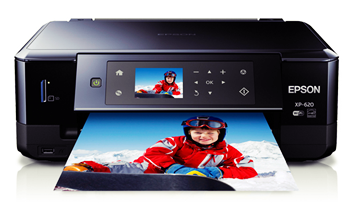
Epson Expression Premium XP-820 Driver Download. Epson Expression Premium XP-820 Wi-fi Colour Photograph Inkjet printer together with Scanning device, Photo-copier as well as Send. Complete-featured : 30-page Car Record Feeder; automobile 2-sided print/copy/scan/color send; automobile lengthen outcome holder, Generate : specialized document assistance, committed picture holder as well as CD/DVD publishing, Laboratory high quality : smudge, scuff, drinking water as well as diminish proof borderless pictures as much as 8? by 10?, Alternative Printer ink Ink cartridges : 273 Standard-capacity Dark, Cyan, Green, Yellow-colored, Photograph Dark
The actual XP-820 is simple to make use of as well as facilitates wifi publishing together with Wi fi, Wi fi Primary as well as Ethernet, connection and don’t neglect and also to supply overall flexibility to do portable publishing having a function Epson’s iPrint, AirPrint as well as Search engines Fog up. The actual Manifestation High quality XP-820 Small-in-One provides hard to beat picture quality2 with regard to brilliant, smudge proof photos3 as much as 8? by 10?, in addition excellent CD/DVDs. Perform a lot more using the 30-page Automated Record Feeder as well as automobile 2-sided publishing, replicating, checking as well as faxing
Epson Expression Premium XP-820 Driver Download System Requirements & Compatibility
- Windows Xp 32bit
- Windows Xp 64bit
- Windows Vista 32bit
- Windows Vista 64bit
- Windows 7 32bit
- Windows 7 64bit
- Windows 8 32bit
- Windows 8 64bit
- Windows 8.1
- Linux
- Mac OS
Epson Expression Premium XP-820 Driver Download Installations
Follow these steps to install the downloaded software and driver.
- Turn on the computer you want to install the printer driver
- Make sure the printer is turned on
- Connect the USB cable from the printer to the computer
- To install the files, Open Folder Location , and then click the downloaded file. The file name ends in .exe.
- You can accept the default location to save the files. Click Next, and then wait while the installer extracts the files to prepare for installation.
- NOTE: If you closed the Download Complete screen, browse to the folder where you saved the .exe file, and then click it.
- When the Install Wizard starts, follow the on-screen instructions to install the software.
Follow these steps to remove installation driver from your computer
- Open Control Panel then click Unistall a Program
- Doubleclick on the printer you want to unistall, and then click yes
- When the uninstall wizard end, click finish
Epson Expression Premium XP-820 Driver Download For Windows 32bit
Driver | Download | |
Windows 8.1, Windows 8 | Download Here | |
Windows 7, Windows XP, Windows Vista | Download Here | |
Epson Expression Premium XP-820 Driver Download For Windows 64 bit
Driver | Download | |
Windows 8.1, Windows 8 | Download Here | |
Windows 7, Windows XP, Windows Vista | Download Here | |
Go to link download
Friday, September 2, 2016
Epson Expression Premium XP 520 Driver Download
Epson Expression Premium XP 520 Driver Download
 |
| Epson Expression Premium XP-520 Driver Download |
Epson Expression Premium XP-520 Driver Download. Epson Expression Premium XP-520 Small-in-One® All-in-One Printer is Ink jet printers which have this particular small style as well as functions a good all-in-one will be able to provide you with incredible designs along with photograph laboratory high quality. Created the greatest quality as much as 5760 by 1440 improved dpi. The actual Inkjet printer Manifestation High quality XP-520 provides a number of choices for publishing, such as publishing straight through the actual Hi-Speed USB. through storage credit cards while offering an approach to wi-fi publishing through Wi fi, as well as Wi fi Direct.
Epson Expression Premium XP-520 Small-in-One provides hard to beat photograph high quality with regard to brilliant, borderless pictures as much as 8? by 10?. Car 2-sided publishing will save period as well as document, as the small style will save room. In addition, you are able to discuss pictures much more methods compared to a person believed achievable. Using the greatest wi-fi connection, this particular extremely slender all-in-one designs through mobile phones as well as pills. This particular effective inkjet printer is perfect for providing spectacular pictures as well as paperwork along with razor-sharp textual content. Easily, the actual XP-520 is ideal for your own active family members.
Epson Expression Premium XP-520 Driver Download System Requirements & Compatibility
- Windows Xp 32bit
- Windows Xp 64bit
- Windows Vista 32bit
- Windows Vista 64bit
- Windows 7 32bit
- Windows 7 64bit
- Windows 8 32bit
- Windows 8 64bit
- Windows 8.1
- Linux
- Mac OS
Epson Expression Premium XP-520 Driver Download Installations
Follow these steps to install the downloaded software and driver.
- Turn on the computer you want to install the printer driver
- Make sure the printer is turned on
- Connect the USB cable from the printer to the computer
- To install the files, Open Folder Location , and then click the downloaded file. The file name ends in .exe.
- You can accept the default location to save the files. Click Next, and then wait while the installer extracts the files to prepare for installation.
- NOTE: If you closed the Download Complete screen, browse to the folder where you saved the .exe file, and then click it.
- When the Install Wizard starts, follow the on-screen instructions to install the software.
Follow these steps to remove installation driver from your computer
- Open Control Panel then click Unistall a Program
- Doubleclick on the printer you want to unistall, and then click yes
- When the uninstall wizard end, click finish
Epson Expression Premium XP-520 Driver Download For Windows 32bit
Driver | Download | |
Windows 8.1, Windows 8 | Download Here | |
Windows 7, Windows XP, Windows Vista | Download Here | |
Epson Expression Premium XP-520 Driver Download For Windows 64 bit
Driver | Download | |
Windows 8.1, Windows 8 | Download Here | |
Windows 7, Windows XP, Windows Vista | Download Here | |
Go to link download
Sunday, August 28, 2016
Epson Expression Premium XP 610 Driver Download
Epson Expression Premium XP 610 Driver Download
 |
| Epson Expression Premium XP-610 Driver Download |
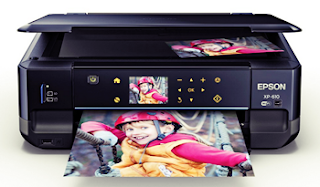
Epson Expression Premium XP-610 Driver Download. Print out stunning borderless photos with the ultra-powerful, ultra-slim Expression High quality XP-610. Consumer-rated unchallenged, unsurpassed photo quality ensures amazing photos whenever, while sharpened textual content suits these photos with regard to eye-catching documents. The XP-610 features the best in wireless publishing. Today it is incredibly easy in order to print from the iPad®, iPhone®, tablet or smart phone, regardless of whether in your home or out and about. In 25% smaller than competitive models, this particular smooth printer packages lots of features, such as car 2-sided publishing, a dedicated photo holder, CD/DVD publishing, built/in credit cards slots5 with regard to PC-free publishing, and much more.
The features of this particular printer are usually Consumer-rated unchallenged, unsurpassed photo quality through a good ultra-powerful Small-in-One, Auto 2-sided publishing; dedicated photo holder, Ultimate wireless with regard to tablet and also smartphones and also outfitted simply by 2 . 5? LCD as well as feel panel.
Epson Expression Premium XP-610 Driver Download System Requirements & Compatibility
- Windows Xp 32bit
- Windows Xp 64bit
- Windows Vista 32bit
- Windows Vista 64bit
- Windows 7 32bit
- Windows 7 64bit
- Windows 8 32bit
- Windows 8 64bit
- Windows 8.1
- Linux
- Mac OS
Epson Expression Premium XP-610 Driver Download Installations
Follow these steps to install the downloaded software and driver.
- Turn on the computer you want to install the printer driver
- Make sure the printer is turned on
- Connect the USB cable from the printer to the computer
- To install the files, Open Folder Location , and then click the downloaded file. The file name ends in .exe.
- You can accept the default location to save the files. Click Next, and then wait while the installer extracts the files to prepare for installation.
- NOTE: If you closed the Download Complete screen, browse to the folder where you saved the .exe file, and then click it.
- When the Install Wizard starts, follow the on-screen instructions to install the software.
Follow these steps to remove installation driver from your computer
- Open Control Panel then click Unistall a Program
- Doubleclick on the printer you want to unistall, and then click yes
- When the uninstall wizard end, click finish
Epson Expression Premium XP-610 Driver Download For Windows 32bit
Driver | Download | |
Windows 8.1, Windows 8 | Download Here | |
Windows 7, Windows XP, Windows Vista | Download Here | |
Epson Expression Premium XP-610 Driver Download For Windows 64 bit
Driver | Download | |
Windows 8.1, Windows 8 | Download Here | |
Windows 7, Windows XP, Windows Vista | Download Here | |
Go to link download
Saturday, August 20, 2016
Epson Expression Premium XP 625 Driver Download
Epson Expression Premium XP 625 Driver Download
 |
| Epson Expression Premium XP-625 Driver Download |
Epson Expression Premium XP-625 Driver Download. Epson Expression Premium XP-625 is an excellent inkjet printer to work upon all-in-one (multifunction printer) effective at offering comfort as well as versatility to be able to print out, duplicate as well as check out. This particular small as well as fashionable Wi fi all-in-one produces exceptional shiny pictures as well as very clear textual content. A big display screen assists enhance functionality.
Excellent pictures as well as textual content, Having a 5-colour person printer ink program such as a photograph dark, Epson’s Claria High quality Printer ink generates exceptional, shiny pictures along with razor-sharp fine detail as well as sharp, very clear textual content paperwork. Simple operationAs nicely like a slanting six. 8cm contact section, the particular XP-625 features a memory position with regard to PC-free operations. The particular XP-625 additionally images upon ideal CD/DVDs.
Epson Expression Premium XP-625 Driver Download System Requirements & Compatibility
- Windows Xp 32bit
- Windows Xp 64bit
- Windows Vista 32bit
- Windows Vista 64bit
- Windows 7 32bit
- Windows 7 64bit
- Windows 8 32bit
- Windows 8 64bit
- Windows 8.1
- Linux
- Mac OS
Epson Expression Premium XP-625 Driver Download Installations
Follow these steps to install the downloaded software and driver.
- Turn on the computer you want to install the printer driver
- Make sure the printer is turned on
- Connect the USB cable from the printer to the computer
- To install the files, Open Folder Location , and then click the downloaded file. The file name ends in .exe.
- You can accept the default location to save the files. Click Next, and then wait while the installer extracts the files to prepare for installation.
- NOTE: If you closed the Download Complete screen, browse to the folder where you saved the .exe file, and then click it.
- When the Install Wizard starts, follow the on-screen instructions to install the software.
Follow these steps to remove installation driver from your computer
- Open Control Panel then click Unistall a Program
- Doubleclick on the printer you want to unistall, and then click yes
- When the uninstall wizard end, click finish
Epson Expression Premium XP-625 Driver Download For Windows 32bit
Driver | Download | |
Windows 8.1, Windows 8 | Download Here | |
Windows 7, Windows XP, Windows Vista | Download Here | |
Epson Expression Premium XP-625 Driver Download For Windows 64 bit
Driver | Download | |
Windows 8.1, Windows 8 | Download Here | |
Windows 7, Windows XP, Windows Vista | Download Here | |
Go to link download
Subscribe to:
Posts (Atom)