Showing posts with label mg5320. Show all posts
Showing posts with label mg5320. Show all posts
Thursday, December 1, 2016
How to setup a wireless network mg5320 for windows
How to setup a wireless network mg5320 for windows
How to setup a wireless network pixma mg5320 for windows - Multifunction installation to your network for the first time canon pixma mg5320.
Network Requirements
Before connecting the machine to the network, make sure that configuration of the computer and access point or router is complete, and that the computer is connected to the network.
 |
How to setup a wireless network |
Wireless Connection


An "Ad-hoc connection," which establishes a direct connection to the computer over a wireless connection without using an access point, is not supported.
A wireless access point or router is required to use your printer on a wireless LAN.
Notes on Network Connection
- The configuration, router functions, setup procedures and security settings of the network device vary depending on your system environment. For details, refer to your devices instruction manual or contact its manufacturer.
- In an office setup, consult your network administrator
- If you connect to a network that is not protected with security measures, there is a risk of disclosing data such as your personal information to a third party.
- If an error message appears or if you have trouble with the network connection, refer to the printed manual: Network Setup Troubleshooting.
- Place the machine and computer on the same network segment
Software Installation Network
To use the machine by connecting it to a computer, software including the drivers needs to be copied (installed) to the computers hard disk.The installation process takes about 20 minutes. (The installation time varies depending on the computer environment or the number of application software to be installed.)
Importan
- Log on as the administrator (or a member of the Administrators group).
- Quit all running applications before installation.
- Do not switch users during the installation process.
- Internet connection may be required during the installation. Connection fees may apply. Consult the internet service provider
- It may be necessary to restart your computer during the installation process. Follow the on - screen instructions and do not remove the Setup CD - ROM during restarting. The installation resumes once your computer has restarted.
- If the firewall function of your security software is turned on, a warning message may appear that Canon software is attempting to access the network. If such a warning message appears, set the security software to always allow access
Installing the pixma mg5320 on Your Wireless Network
If you are installing your printer on your network for the first time, a step-by-step walk through of the wireless setup is built in to the installation routine of the software that shipped with your PIXMA.
Insert the Setup CD-ROM
That came with your printer into your CD-ROM drive and proceed through the easy to follow instructions. Follow the on-screen instructions. Be sure to select Wireless connection on the Connection Method Selection screen (1-2). Continue to follow instructions until the Setup Procedure Selection screen (3-1)appears.
Next a detail complete guide : Download guide manual
Go to link download

Sunday, November 27, 2016
Canon Pixma MG5320 Driver Wireless Inkjet Photo
Canon Pixma MG5320 Driver Wireless Inkjet Photo
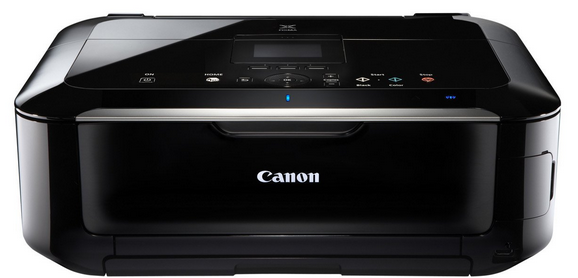 |
Canon Pixma MG5320 Driver |
Built-in Wi-Fi1 tech allowing you to easily print and scan wireless virtually Everywhere around your house. Print gorgeous, borderless at home up to 8.5 "x 11" size with a maximum a print resolution of 9600 x 2400 color dpi and five individual ink tanks.
Have a all sorts of fun new with your images by adding a new effects like Fish Eye, Reviews Miniature, Toy Camera, Soft Focus and Blur Background before you print out. Enjoy the new ball as Pixma Cloud printing option link allows you to easily print images from online photo album Canon Image Gateway and Picasa as well as templates include seasonal outdoor a stationary and calendars from a compatible Canon Pixma Wireless All-in-One, all without any computer.
Built-in Auto Duplex Printing allows you to automatically print on both sides of the paper and can help paperless and costs up to 50%. MG5320 also lets you print on CD, DVD and Blu-ray, and you can even turn your HD Movie clips into beautiful photos.
Look a beautiful, easy-to-view scans by advanced image analyzers and area-by-area corrections to the data, will automatically. Plus, you can print and scan jpeg and pdf files wirelessly from compatible iPad, iPhone, iPod touch, and Android devices without a computer. And, enjoy the option printing directly from the on a compatible memory cards, USB Flash Drives, PictBridge and optional Bluetooth devices.
Easy-WebPrint EX:
The print exactly what you want from a web, easily. Easy-WebPrintEX allows you to create your own layouts, take different sections of different website and put them all on one page. Move, resize and crop your clips, insert and edit text notes, making it a portrait or landscape, print up to three columns on a page and even save the table as a PDF file.
Pixma Cloud Link:
Easily print pictures from online photo albums Canon Image Gateway and Picasa as well as templates including seasonal a stationary and calendars from a compatible Canon PIXMA Wireless All-in-One.
AirPrint:
Wirelessly print photos, email, web pages, documents, and more from compatible iPad, phone, or iPod touch to a compatible Canon Pixma Wireless All-In-One.
Mobile Printing:
Take full advantage of the Canons Wi-Fi connectivity to unlock, print and share your photos saved there. Print photos wirelessly from compatible iPad, iPhone, iPod touch and Android devices.
Please download the following printer driver according to the printer you are using, if there is a broken link contac us!
| MG5300 series Mini Master Setup (Windows 8.1/8.1 x64/8/8 ) | 10/01/13 | 23.49 MB | Download |
| MG5300 series MP Driver Ver. 1.01 (Windows 8.1/8.1 x64/8) | 10/01/13 | 17.39 MB | Download |
| MG5300 series XPS Printer Driver Ver. 5.56a (Windows 8.1/.) | 10/01/13 | 15.40 MB | Download |
| MG5300 series Master Setup (Windows 7/7 x64/Vista/Vista64.) | 07/25/11 | 171.44 MB | Download |
| Easy-PhotoPrint EX Ver. 4.5.0 (Windows 8.1/8.1 x64/8/8 x64) | 01/07/15 | 57.54 MB | Download |
| Easy-WebPrint EX Ver. 1.5.0 (Windows 8.1/8.1 x64/8/8 x64) | 01/07/15 | 17.43 MB | Download |
| My Image Garden Ver. 3.1.1 (Windows 8.1/8.1 x64/8/8 x64/7) | 01/07/15 | 292.34 MB | Download |
| MP Navigator EX Ver. 5.0.2 (Windows 8.1/8.1 x64/8/8 x64/7) | 08/29/14 | 47.81 MB | Download |
| MG5300 series Master Setup (Windows 7/7 x64/Vista/Vista64) | 08/16/11 | 171.44 MB | Download |
| MG5300 series Scanner Driver Ver. 18.0.1b (OS X 10.5/10.6) | 10/07/14 | 12.81 MB | Download |
| MP Navigator EX Ver. 5.0.3 (OS X 10.7/10.8/10.9/10.10) | 10/07/14 | 35.41 MB | Download |
| MG5300 series CUPS Printer Driver Ver. 11.7.1.0 (OS X 10.) | 09/30/14 | 16.07 MB | Download |
| ICA Driver Ver. 3.3.4 (OS X 10.6/10.7/10.8/10.9/10.10) | 09/24/14 | 8.62 MB | Download |
| Easy-PhotoPrint EX Ver. 4.6.0 (OS X 10.7/10.8/10.9/10.10) | 01/07/15 | 102.18 MB | Download |
| My Image Garden Ver. 3.1.0 (OS X 10.6/10.7/10.8/10.9/10.10) | 01/07/15 | 297.83 MB | Download |
| MG5300 series Mini Master Setup (OS X 10.5/10.6/10.7/10.8) | 03/21/14 | 50.21 MB | Download |
| MG5300 series Master Setup (Mac OS X 10.4/10.5/10.6) | 07/25/11 | 208.86 MB | Download |
| Canon IJ Network Tool Ver. 3.2.0 for Power PC (OS X 10.4/) | 07/10/12 | 4.79 MB | Download |
Operation System Compability :
Windows 7,Windows Vista, Windows XP and Mac OS X v. 10.4.11 to 10.6.x15
Go to link download
Subscribe to:
Posts (Atom)