Showing posts with label cool. Show all posts
Showing posts with label cool. Show all posts
Friday, September 23, 2016
3d Ultra Cool Pool Snooker Game Free Download Full Version
3d Ultra Cool Pool Snooker Game Free Download Full Version


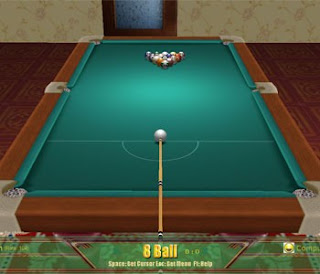
3d Ultra Cool Pool Snooker Game!
File Size:100.09MB
- System Requirements!
- Cpu: 700MHz
- Ram: 64 MB
- Video Memory: 32MB
- Windows Xp,7,Vista
Password = www.saifchachar.blogspot.com
Download Now
Go to link download

Sunday, August 21, 2016
Add Cool Social Media Sharing Touch Me Widget For Blogger
Add Cool Social Media Sharing Touch Me Widget For Blogger

This widget should be working like the picture above or you can see it at demo page.
DEMO HERE
How To Add Cool Social Media Sharing Touch Me Widget To Blogger?
1. Go To Blogger Dashboard > Layout.
2. Choose "Add a Gadget".
3. Select HTML/JavaScript.
4. Copy and paste below code inside it:
<style>
/*--------Touch Me Sharing Widget ------*/
.touchme a {
display:block;
height:50px;
width:50px;
padding:0 4px;
float:left;
background:transparent url(http://mybloggertricks.googlecode.com/files/Sharing%20Touch%20Me.png) no-repeat;
-webkit-transition: ease-in 0.2s all;
-moz-transition: ease-in 0.2s all;
-o-transition: ease-in 0.2s all;
-ms-transition: ease-in 0.2s all;
transition: ease-in 0.2s all;
cursor:pointer;
}
.touchme a.googleplus {
background-position: 0px -58px;
}
.touchme a.googleplus:hover {
background-position: 0px 0px;
}
.touchme a.twitter {
background-position: 0px -290px;
}
.touchme a.twitter:hover {
background-position: 0px -232px;
}
.touchme a.facebook {
background-position: 0px -406px;
}
.touchme a.facebook:hover {
background-position: 0px -348px;
}
.touchme a.rss {
background-position: 0px -174px;
}
.touchme a.rss:hover {
background-position: 0px -116px;
}
</style>
<div class=touchme>
<!--RSS-->
<a class=rss href="YOUR RSS LINK" rel=external nofollow target=_blank></a>
<!--Google Plus-->
<a class=googleplus href="YOUR GOOGLE PROFILE LINK" rel=external nofollow target=_blank></a>
<!--Facebook-->
<a class=facebook href="YOUR FACEBOOK LINK" rel=external nofollow target=_blank></a>
<!-- Twitter -->
<a class=twitter href="YOUR TWITTER LINK" rel=external nofollow target=_blank ></a>
</div>
Note:
- Replace YOUR RSS LINK with your Feed burner link.
- Replace YOUR GOOGLE PROFILE LINK with your Google+ URL
- Replace YOUR FACEBOOK LINK with your Facebook URL
- Replace YOUR TWITTER LINK with your Twitter Profile URL
5. Save it and you are done.
Thanks to MyBloggerTricks for this code.
Have a nice day. Do not forget to share and comment. =)
Go to link download
Subscribe to:
Posts (Atom)