Showing posts with label id. Show all posts
Showing posts with label id. Show all posts
Tuesday, November 1, 2016
How To Find Identify Blogger Widget Gadget ID
How To Find Identify Blogger Widget Gadget ID
There is several ways to find a blogger widget/gadget ID.
- Using firebug
- Searching on Template
Steps to follow:
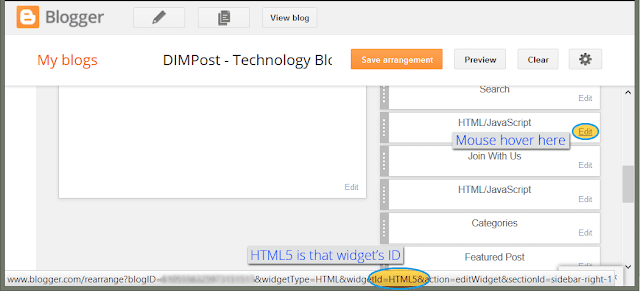
1. Go to your Blogs Dashboard > Layout2. Mouse hover on your widgets Edit link
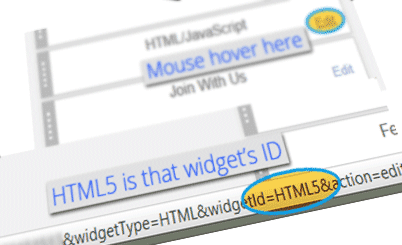
3. A floating URL will came out at the bottom of your browser. (See image) In the URL you can find your widget ID by looking there "widgetId=HTML5". Here "HTML5" the ID.
Or Alternatively
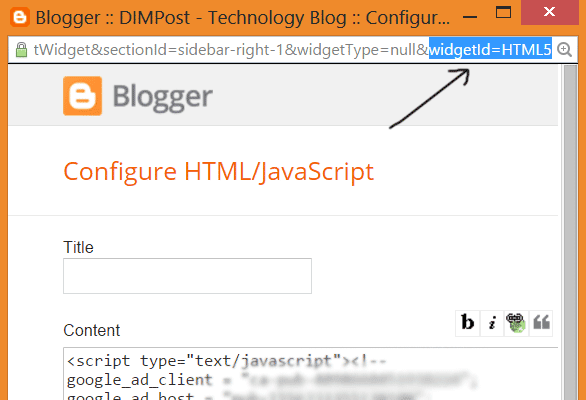
2.1 Click on Edit Button of the Gadget2.2 A new small window will pop up. Look at the address bar of that window. At the very end of the URL you will find the Gadget/Widget ID. (See The Screenshot Below)
I hope that this little article may help you . Dont forget to say thanks :p. And stay with DIMPost.
Go to link download

Subscribe to:
Posts (Atom)