Showing posts with label labels. Show all posts
Showing posts with label labels. Show all posts
Friday, October 28, 2016
Customize Blogger Labels With CSS3
Customize Blogger Labels With CSS3
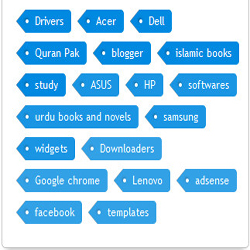
How can you add labels in bloggers blog?
- Log in to your blogger account.
- Click on blog title in which you want to add This Subscriber box.
- Go to layout and then click on Add a Gadget.
- Select label and set your label style to cloud and hit save.
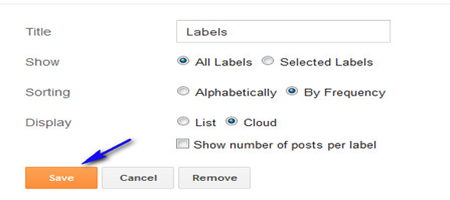
Customization:
- First go to your blogger template
- Click on edit and check expand widget box
- Then click ctrl+f and find ]]></b:skin>
- Just above it paste the below code.
/*----- KH LABEL STYLE START-----*/
.label-size{
margin:0;
padding:0;
position:relative;
}
.label-size a{
float:left;
height:24px;
line-height:24px;
position:relative;
font-size:12px;
margin-bottom: 9px;
margin-left:20px;
padding:0 10px 0 12px;
background:#0089e0;
color:#fff;
text-decoration:none;
-moz-border-radius-bottomright:4px;
-webkit-border-bottom-right-radius:4px;
border-bottom-right-radius:4px;
-moz-border-radius-topright:4px;
-webkit-border-top-right-radius:4px;
border-top-right-radius:4px;
}
.label-size a:before{
content:"";
float:left;
position:absolute;
top:0;
left:-12px;
width:0;
height:0;
border-color:transparent #0089e0 transparent transparent;
border-style:solid;
border-width:12px 12px 12px 0;
}
.label-size a:after{
content:"";
position:absolute;
top:10px;
left:0;
float:left;
width:4px;
height:4px;
-moz-border-radius:2px;
-webkit-border-radius:2px;
border-radius:2px;
background:#fff;
-moz-box-shadow:-1px -1px 2px #004977;
-webkit-box-shadow:-1px -1px 2px #004977;
box-shadow:-1px -1px 2px #004977;
}
.label-size a:hover{background:#555;}
.label-size a:hover:before{border-color:transparent #555 transparent transparent;}
/*----- KH LABEL STYLE END-----*/
Note: if you want to change the color of your label chose your color and replaces it with #0089e0 And changing shadow effect then change this one #004977
Finally save your template you are done.
Go to link download

Subscribe to:
Posts (Atom)