Showing posts with label beautiful. Show all posts

Sunday, December 4, 2016

Beautiful Join Us On Facebook Fixed Widget for Blogger 2013

Beautiful Join Us On Facebook Fixed Widget for Blogger 2013


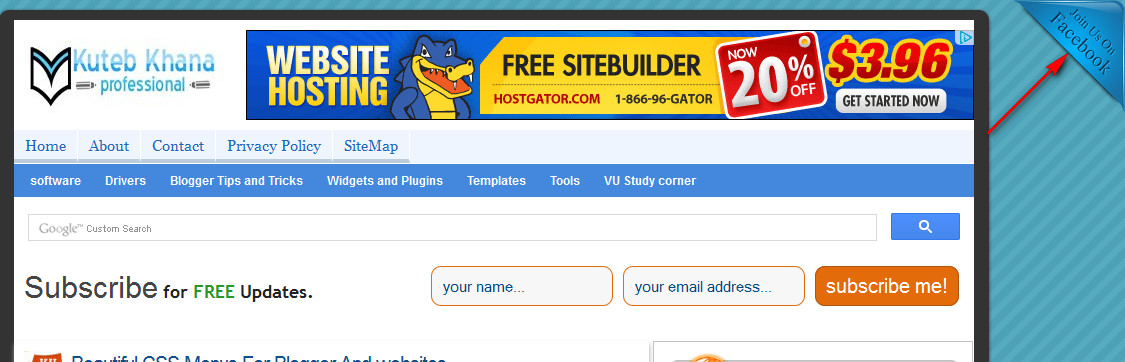
A few days ago I published an article how to add Facebook like page box in bloggers blog. But now today I am shearing a beautiful join us on Facebook fixed widget for blogger blog. As you know Facebook is one of the biggest social media to increase your admirer. From this beautiful social media Facebook widget you can inspire your viewers to like your fan page on Facebook and can get more and more viewers for your blog or website. You can add this widget on both side of your web pages at the top of right side and left side. So let’s enjoy follow these simple steps to add this beautiful Facebook widget in blogger blog.

Add facebook like page box in blogger
CSS3 keyboard like text effect in blogger

How to add this beautiful join us on Facebook widget?


  •  Log in to your blogger account.
  •  Click on blog title in which you want to add This beautiful Widget.
  •  Go to layout and then click on Add a Gadget.
  •  Select Html/JavaScript and paste the below code in it.
LIVE DEMO

  • Join Me On FacebookAt top of Right Corner Use The Code Below.



     <style>#facebook {position: fixed;top: 0;right: 0;z-index: 9997;cursor: pointer;}</style><a href=http://www.facebook.com/kutebkhana id=facebook target=_blank><img alt=Join Me On Facebook src=https://blogger.googleusercontent.com/img/b/R29vZ2xl/AVvXsEgDWnqZEUwIlK8vRivdt5_U2G24-XyHDLMkuQqxoTr8eP3yD18-zy-_d7keXP5su1-JTLSdgB8afeib3wC6KUNavOZij9QZKkqHhSSWcTbLECvxYrHP0QC8xUAgriZLwb3n1cW4doI8O44/s1600/JoinUsOnFacebook.png/></a>
  •   At top of left corner use the code below.
Join Me On Facebook


<style>#facebook {position: fixed;top: 0;left: 0;z-index: 9997;cursor: pointer;}</style><a href=http://www.facebook.com/kutebkhana id=facebook target=_blank><img alt=Join Me On Facebook src=https://blogger.googleusercontent.com/img/b/R29vZ2xl/AVvXsEjHSPeX99Cx0zvknTk1tCHOSCj7gNRz82ThvmhNk1YJwqGBdBa5pzJE6qW37gS7OyIWjdUd37g0KJFBbqVlIJNO-dSOK_j_FvYhKFtUWd-wGPIum6yiPe1t5T4sDT3zKk7rIluTWj0mjSs/s1600/JoinUsOnFacebook.png/></a>


Customization!


  • Replace kutebkhana page title with your own page title.

You Are Done!

If you have any problem feel free to ask me in comment section.......

Go to link download

Read more »

Friday, November 11, 2016

Beautiful CSS Menus For Blogger And websites

Beautiful CSS Menus For Blogger And websites


Beautiful CSS Menus For Blogger And websites
As earlier I published many of CSS tutorials for websites and blogger BlogSpot but now today I am shearing with you beautiful CSS menu with cursor hover effect in two styles hope you like it this beautiful CSS horizontal menu. As you know in world of web designing we discover further work with CSS and CSS3. CSS3 is the latest version of CSS. These beautiful menus contain rounded body with two different border effects and also have cursor hover effect. Solid border CSS menu as seen like capsule shell type. These menus are awesome and can be included in both websites and blogger blogs. Below is the list of menus along with CSS and HTML codes. Just love them and enjoy happy blogging.


CSS3 keyboard like text effect in blogger

How to Add CSS menus to blog?

  • Log in to your blogger account.
  •  Click on blog title in which you want to add This.
  •  Go to layout and then click on Add a Gadget.
  • Select "HTML/JavaScript" Widget.
  •  Copy the below code and paste in it then Hit save. 


    Live demo


    Solid border style

    <style>

        .kk-menu span {
            background:#9933ff;
            display:inline-block;
            font-family:verdana;
            border-right: 10px solid #000000;
            border-left: 10px solid #000000;
            -moz-border-radius:10px;
            -webkit-border-radius:05px;
             border-radius:10px;
            line-height:3em;
            padding:0 1em;
            margin-top:0.5em;
            position:relative;
              -webkit-transition: background-color 0.2s, margin-top 0.2s;
            -moz-transition: background-color 0.2s, margin-top 0.2s;
            -ms-transition: background-color 0.2s, margin-top 0.2s; 
            -o-transition: background-color 0.2s, margin-top 0.2s;  
            transition: background-color 0.2s, margin-top 0.2s;
        }
        .kk-menu a:hover span {
            background:#0099ff;
            margin-top:0;
        
        }
        .kk-menu a:link, .kk-menu a:visited {
            color:#000;
            text-decoration:none;
            float:left;
            height:3.5em;
            overflow:hidden;
        }
       
        </style>

        <div class=kk-menu>
            <a href=#><span>Home</span></a>
            <a href=#><span>Widget</span></a>
            <a href=#><span>Tricks</span></a>
            <a href=#><span>Sitemap</span></a>
            <a href=#><span>CSS</span></a>
            <a href=#><span>Contact</span></a>
            <a href=#><span>Tools</span></a>
        </div>


    Doted border style

         <style>

        .kkh-menu span {
            background:#9933ff;
            display:inline-block;
            font-family:verdana;
            border-right: 05px dotted #000000;
            border-left: 05px dotted #000000;
            -moz-border-radius:10px;
            -webkit-border-radius:05px;
             border-radius:10px;
            line-height:3em;
            padding:0 1em;
            margin-top:0.5em;
            position:relative;
              -webkit-transition: background-color 0.2s, margin-top 0.2s;
            -moz-transition: background-color 0.2s, margin-top 0.2s;
            -ms-transition: background-color 0.2s, margin-top 0.2s;
            -o-transition: background-color 0.2s, margin-top 0.2s;
            transition: background-color 0.2s, margin-top 0.2s;
        }
        .kkh-menu a:hover span {
            background:#0099ff;
            margin-top:0;
        
        }
        .kkh-menu a:link, .kkh-menu a:visited {
            color:#000;
            text-decoration:none;
            float:left;
            height:3.5em;
            overflow:hidden;
        }
       
        </style>

        <div class=kkh-menu>
            <a href=#><span>Home</span></a>
            <a href=#><span>Widget</span></a>
            <a href=#><span>Tricks</span></a>
            <a href=#><span>Sitemap</span></a>
            <a href=#><span>CSS</span></a>
            <a href=#><span>Contact</span></a>
            <a href=#><span>Tools</span></a>
        </div>

    Customization!


    • When you paste the code in Html/JavaScript widgets in blogger blog see the example in below screen shot.


    • If you want two replace your link and anchor text with the default one simply find lines like below one in the above code.

    <a href=#><span>Widget</span></a>


    • Replace the # sign with your link and the default text like “Widget, tricks, sitemap” with your anchor text.


    Note:

    If you have questions and facing some problems and difficulties while adding them to your blog feel free to ask me in comment section…..

    Add Google+ Followers Box In Blogger
    Add A New Widget Container Below Header

    Go to link download

    Read more »

    Sunday, October 30, 2016

    Subscribe Widget With Beautiful Social Media Profile For Blogger

    Subscribe Widget With Beautiful Social Media Profile For Blogger


    Subscribe Widget box
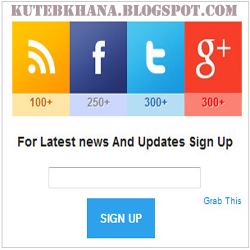
    A few days ago I published a tutorial about how can you add facebook page like box in your blogger or website to increase your fans like but now I am going to tell you about how you can add a Subscriber box with social media icon into your website or blogger blog without difficulty. This is a great widget for blogger blog and websites which is used to promote your fan page and definitely increase your like and also increase your subscriber. 
    So, follow these steps to add subscriber box 
    with social media icons in blogger.


                                                                            Live Demo

    Add Subscribe Widget With Social Media to Blogger:

    • Log in to your blogger account.
    •  Click on blog title in which you want to add This Subscriber box.
    •  Go to layout and then click on Add a Gadget.
    •  Select Html/JavaScript and paste the below code in it. 


    <style> 
     #KHsocialcounters{ 
     width:300px; 
     padding: 0 0 40px 0; 
     border: 1px solid #CCC;} 
     ul#KHcounters { 
       list-style: none; 
       margin:0px; 
       overflow: hidden; 
       width:300px; 
       padding:10px 0 40px 0; 
        margin:10px 0 -60px 12px; 
     } 
     ul#KHcounters li { 
       float:left; 
       margin:0px 0px 5px 0px; 
       width:auto; 
       padding:0px; 
       -webkit-transition: all .2s ease-in-out; 
       -moz-transition: all .2s ease-in-out; 
       transition: all .2s ease-in-out;} 
     ul#KHcounters li a { 
       display: block; 
       height: 50px; 
       margin-right: 0px; 
       padding-top: 75px; 
       text-align: center; 
       text-decoration: none; 
       width: 70px; 
       text-shadow: 1px 1px 0 rgba(255,255,255,0.5); 
       font-weight: bold; 
     } 
     ul#KHcounters li:hover { 
       opacity:0.6
     } 
     ul#KHcounters li:last-child a{ 
       margin-right:0px; 
     } 
     ul#KHcounters #counter-rss { 
    background:url(https://blogger.googleusercontent.com/img/b/R29vZ2xl/AVvXsEj7LDGg6X3D_8MMHqh7u6YsvRFBzLXOK_K3vl5ZS99tG5FmFoiOvo_QkRX8o1NPbX2K7xNRfhAW_ajz3HLA-r5hs3eBs5IFMos_hyphenhyphenapc872c4Ge4ts44BPG-_96t8GAcOlZVDWxp_YLQ2U/s1600/KH-rss-counter.jpg) no-repeat 
     } 
     ul#KHcounters #counter-rss a { 
       color:#cf6600 
     } 
     ul#KHcounters #counter-facebook { 
    background:url(https://blogger.googleusercontent.com/img/b/R29vZ2xl/AVvXsEgdbC3ryO8cv1uyPOEboqaf0sJPlr4yWBOSfYbnxwgEec31SYY2pl5PJll1fl97tFP8CuGuv3YREb9jE_J7BSIJkIdgeYLxP5AxZH4YKoUpAGf311bPBM8mLDpHBZkiWhoDuJhrGlcVYSo/s1600/KH-facebook-counter.jpg) no-repeat 
     } 
     ul#counters #counter-facebook a { 
      color:#3b4d8f 
     } 
     ul#KHcounters #counter-twitter { 
    background:url(https://blogger.googleusercontent.com/img/b/R29vZ2xl/AVvXsEgKGFjinX2r2Fw9GXjwnTaUj1vKoY_6jD5-vrMWsGznAoGhXr-XUfacXDH2RZO2roVCXU1anyNzTk6Gd4n0ya7iRWmKBLlYz4X8l-rXWR5fVBMVNF1stXxdxpEiI6ERjor9V30R6AbvpKs/s1600/KH-twitter-counter.jpg) no-repeat 
     } 
     ul#KHcounters #counter-twitter a { 
       color:#276ab6 
     }
    ul#KHcounters #counter-google { 
    background:url(https://blogger.googleusercontent.com/img/b/R29vZ2xl/AVvXsEhu6WULfGNbDkADvJf72QbLWZK13Yc3fofwe8MTQi0yBMe1G34piff1TlwytExu_9APeMML3xLxCbPmmZC5mYcH5s5fpFWq5iMWqxRW26CMtCFXyE7DkhNCxDTtVkFiOjhhjIJLBbvrcdQ/s1600/KH-google-counter.jpg) no-repeat 
     } 
     ul#KHcounters #counter-google a { 
       color:red 
     }   
     .textwidget {width: 300px;margin-top: -50px;} 
    input[type="submit"]{color:white;border:0px;text-transform:uppercase;font-size:11px;padding:13px;float:left;font-weight:bold;background-color:#2DA1EB;margin-left:100px;cursor: pointer;margin-top: 10px;} 
     </style> 
     <center> 
     <br /> 
     <div id="KHsocialcounters"> 
     <ul id="KHcounters"> 
     <li class="first-item" id="counter-rss"> 
     <a href="http://feeds.feedburner.com/kutebkhana">100+</a></li> 
     <li id="counter-facebook"> 
     <a href="http://www.facebook.com/kutebkhana">250+</a></li> 
     <li id="counter-twitter"> 
     <a href="https://twitter.com/shakeelasghar">300+</a></li> 
    <li id="counter-google"> 
     <a href="https://plus.google.com/u/0/116054827022382240041">300+</a></li> 
     </ul> 
     <div class="KHtextwidget"> 
    <formaction="http://feedburner.google.com/fb/a/mailverify"method="post" onsubmit="window.open(http://feedburner.google.com/fb/a/mailverify?uri=kutebkhana, popupwindow, 
    scrollbars=yes,width=350,height=520);return true" style=" padding: 3px; text-align: center;" target="popupwindow"> 
     <h3>For Latest news And Updates Sign Up</h3><br /> 
     <input name="email" style="width: 180px;" type="text" /><br /> 
     <input name="uri" type="hidden" value="kutebkhana" /><input name="loc" type="hidden" value="en_US" /><input type="submit" value="Sign Up" /></form></div><a href="http://kutebkhana.blogspot.com/2013/03/subscribe-widget-with-beautiful-social.html" style="margin-right: -50px;margin-top: 
    100px;font-size: 10px;">Grab This</a> 
     </div></center>


    Customization!

    • Replace "kutebkhana" "kutebkhana" "shakeelasghar"and "116054827022382240041" with your own feed, facebook, twitter, and google plus ID.
    •   Change 100+ 250+300+ 300+ according to your like and subscriber and then save the gadget.


    You Are  Done!

    Enjoy keep visiting!

    Note: After a week manually change Facebook like twitter follower, and subscriber.

    if you have any question and any problems feel free write a comments.


    Go to link download

    Read more »

    Sunday, October 23, 2016

    10 New Beautiful Templates For Blogger

    10 New Beautiful Templates For Blogger


    10 New Beautiful Templates For Blogger


    1. Aparatus

    Blogger Template Image
    Aparatus has a clean, professional look without being too stodgy. The rich red bars and headers make the page pop, and the dashed border gives it a touch of texture, but theres still plenty of easy-breathing white space. Header bar pages are enabled, and the Twitter update icon at the top displays your latest tweet. A nice open title space at the top means theres plenty of room for a logo image, and no worries about crowding the design. Just be sure to grab a swatch of that lovely red if you plan to add your own graphic elements.
    Live Demo


    2. Notepad

    Blogger Template Image
    Weve certainly seen paper and handwriting-themed blog templates before, but this notepad layout is really fresh, with smooth graphic elements and subtle textures. Social media links are built-in right at the top (which we dig, of course), and your pages and search bar sit snugly in the binding of this yellow legal-style pad. The dates of your post hang neatly in the margin, which is a nice touch, and the mellow-yellow of the pad itself is no distraction from your text.
    The design does get a little flowery toward the bottom, and theres no amount of CSS magic that will ever set your text properly on the lined paper (OCD bloggers, beware!), but in all, this theme is clean enough for serious content, and cute enough for more personal musings.
    Live Demo


    3. Clean Type

    Blogger Template Image
    If youre a modern minimalist, Clean Type may be the look youre after. Youd get lost in all the empty white space if it wasnt for the punchy orange accents on links and menu items. The orange is also a refreshing departure from some more common color schemes. The template keeps elements spaced nicely, with left-hand navigation and a nice empty title space where you can pop in your brand or personal logo. Keep it in the orange family and youve got one sharp looking header.
    Live Demo


    4. Twitter

    Blogger Template Image
    We think youll dig this one — a near replica of the Twitter homepage for Blogger. The layout is right on the money, complete with the soft blue clouds wafting in the background. Each blog post resembles a tweet, and the fonts in the side bar line up nicely with the space for profile info. With some well-placed widgets, you might really be able to fool some people — which could be good or bad, depending on your intentions.
    Live Demo


    5. Tune Up

    Blogger Template Image
    If blue is your color, look no further than this theme, which serves up some cool hues without over-complicating things. A header stripe brings your home page into the third dimension, and all your widgets and boxes live on smooth aqua gradients. The rest of the space is white, so in-post graphics stow safely away from potential color clashes.
    Live Demo


    6. Indicator

    Blogger Template Image
    You can get a little darker without going all mysterious. The Indicator theme has a serious tone, but maintains its design chops. A bit of grain textures the dark background, and the nice wide columns make it ideal for posting YouTube videos and larger images. Personally, I love the arrow tabs that break out from the main column and divvy up the side bar with attitude. This theme is bold, sharp, and functional — grab it now, before your friends do.
    Live Demo


    7. Vio

    Blogger Template Image
    If youre looking to make your blog a bit more feminine without totally "pinking it out," take a peek at the Vio theme. It offers a smooth purple header, lots of open white space, and some unique layout elements. Its essentially a two-column blog with the side bar cut in half to make a third column. While they are narrow, these columns are great for keeping extra content (and ads) right up near the top where visitors can see them. Other nice touches include the dark gradient comment bubbles on each post, matching search button, and purple blockquote formatting.
    Live Demo


    8.

    Go to link download

    Read more »

    Wednesday, October 19, 2016

    the most beautiful HD wallpaper package for computer

    the most beautiful HD wallpaper package for computer


    Download now the most beautiful wallpaper for computer for free.The package contain more than 500 picture .Download it now


    GALLERIES


    INFO

    The biggest high definition wallpaper 
    Size : 322 Mb
    Contain : 1000 Image


    DOWNLOAD

    HotFile
    Part1
    Part 2


    Go to link download

    Read more »