Showing posts with label box. Show all posts
Showing posts with label box. Show all posts
Monday, November 14, 2016
How To Add Facebook Like Page Box In Your Bloggers Blog
How To Add Facebook Like Page Box In Your Bloggers Blog

So, follow these steps to add social media Facebook page like box in blogger.
Add Facebook Page like Box to Blogger:
- Log in to your blogger account.
- Click on blog title in which you want to add This beautiful like box.
- Go to layout and then click on Add a Gadget.
- Select Html/JavaScript and paste the below code in it.
<iframe src="//www.facebook.com/plugins/likebox.php?href=http://www.facebook.com/kutebkhana&width=320&height=275&
amp;colorscheme=light&show_faces=true&border_color&stream=false&header=false&" style="border:none; overflow:hidden; width:320px; height:258px;" ></iframe>
Customization!
- Replace kutebkhana page title with your own page title.
- Change width=320 and height=275 according to your blog template and save the gadget.
You Are Done!
Go to link download

Tuesday, September 13, 2016
Add Author Box with Rotator Image Effects in Blogger Sidebar or Footer
Add Author Box with Rotator Image Effects in Blogger Sidebar or Footer

how to Add Author Box with Rotator Image
Effects in Blogger Sidebaror Footer.
This author box contains rotator image effect
that means when your mouse cursor come on
image then it will rotate. I have tried to bring
little variety I include colored border your can
easily change color of border and other things.
This widgets Have great css effect.
How can you Add Author Box in bloggers blog?
- Log in to your blogger account.
- Click on blog title in which you want to add This Author box.
- Go to layout and then click on Add a Gadget.
- Select "HTML/JavaScript" Widget.
- Copy the below code and paste in it then Hit save.
Live Demo
<style>.KHprofileBorder {margin:5px auto;padding:10px;width:auto;
border-radius:5px;border: 2px #3322dd
solid;min-height:125px;
width:275px;}
#KHprofile{border:2px solid #888;
margin:2px 5px 0px 5px; padding:2px;
}
#KHprofile:hover {border:2px solid #ccc;cursor:pointer;
}
.KHprofileopacity {opacity: 0.5;margin-left: 50px;
-moz-transition: all 0.5s ease-out;
-o-transition:
all 0.5s ease-out;
-webkit-transition: all 0.5s ease-out; -ms-transition:
all 0.5s ease-out;
transition: all 0.5s ease-out;
-moz-transform: rotate(8deg);
-o-transform: rotate(8deg);
-webkit-transform: rotate(8deg);
-ms-transform: rotate(7deg); transform: rotate(8deg);
sizingMethod=auto expand);
zoom: 1; }
.KHprofileopacity:hover {opacity: 1;
margin-left: 0px;-moz-transform:
rotate(0deg); -o-transform: rotate(0deg);
-webkit-transform: rotate(0deg);
-ms-transform: rotate(0deg);
transform: rotate(0deg);
sizingMethod=auto expand);
zoom: 1;
-moz-box-shadow: 1px 1px 4px #000;
-webkit-box-shadow: 2px 2px 8px #000;
box-shadow: 2px 2px 8px #000;} </style>
<div class="KHprofileBorder">
<img class="KHprofileopacity" id="KHprofile" height=65
src="http://3.bp.blogspot.com/-61Gvbm5glB8/
UPpeVQAMZ1I/AAAAAAAAADM/oAOmgWv2GLI/s1600
/429379_242610719163393_2098735386_n.jpg "
width=50 align="left"/>Im
<a rel="me" href=https://plus.google.com
/u/0/116054827022382240041/
title="Shakeel Asghar" target="_blank"> Shakeel Asghar
</a>from Lahore Pakistan. Founder of
<a href="http://kutebkhana.blogspot.com/">KutebKhana</a>
I love to blogging and
sharing tips and tricks with my readers.
I
am a Part time blogger.
Design Blogger template,
Web Developing and Designing.>>><a style="color:red;
"href="http://kutebkhana.blogspot.com/p/blog-
page.html " target="_blank">Read More »</a>
</div></div>
Customization!
- Change 116054827022382240041
with your G+ ID and write your own information.
- Change http://kutebkhana.blogspot.com/p/blog-page.html
link with your About Us Page.
- Change http://3.bp.blogspot.com/-61Gvbm5glB8
/UPpeVQAMZ1I/AAAAAAAAADM/oAOmgWv2GLI/s1600
/429379_242610719163393_2098735386_n.jpg
with your Image link. - If you want to change height and width of
width then simply change for
height
125px For width 275px.
Enjoy You Are Done!
Go to link download
Tuesday, September 6, 2016
Add Login Box Login Form code For Blogger Blog
Add Login Box Login Form code For Blogger Blog

In this post we will learn how to add the Login box in your blogger/blogspot blog. Blogger Users here we go with the steps.
I hope you know how to add widgets to your blog.
1. Log in to your dashboard–> layout

2. Click on “Add a Gadget” where you need to place the login box or form.

3. A Pop-up window will open and select the Click on “Add a Gadget” and select “HTML/Java Script”.

4. Copy the code below and Paste Inside the box.
<form action="https://www.google.com/accounts/ServiceLoginBoxAuth" method="post" onsubmit="onlogin()"><input value="http://www.blogger.com/loginz?d=%2Fhome&p=http%3A%2F%2Fwww.blogger.com%2F" name="continue" type="hidden"/><input value="blogger" name="service" type="hidden"/><input value="8" name="nui" type="hidden"/><input value="8" name="naui" type="hidden"/><input value="2" name="fpui" type="hidden"/><input value="3" name="uilel" type="hidden"/><input value="true" name="skipvpage" type="hidden"/><input value="false" name="rm" type="hidden"/><input value="true" name="alwf" type="hidden"/><input value="http://www.blogger.com/login.g" name="roeu" type="hidden"/><input value="0" name="alinsu" type="hidden"/><input value="WbQ8QiJfUvA" name="GA3T" type="hidden"/><div><label for="Email"> Username: <br/><input id="Email" tabindex="1" value="" name="Email" size="20" type="text"/></label></div><div><label for="Passwd"> Password: (<a href="https://www.blogger.com/forgot.g" target="_top" title="Forgot your password?">?</a>) <br/></label><input id="Passwd" tabindex="2" autocomplete="off" name="Passwd" size="20" type="password"/></div><br/><input id="signin-btn-ns" tabindex="0" value="Sign in" class="ubtn ubtn-block" name="submit" type="submit"/></form>
5. Save the Html/Javascript and go on to your page to see how it looks.
6. If you have some idea on html, play with the variables used above to make the login box/ login form suitable for your blog.
If you have done everything correct, you should have the followng box in your blog as below.
Go to link download
Wednesday, August 24, 2016
How To Add Google Followers Box In Blogger Sidebar Or footer
How To Add Google Followers Box In Blogger Sidebar Or footer

But This useful widget increases your Google+ followers and connects your viewers through social media.
CSS3 keyboard like text effect in blogger
How to add Google+ Follower Box in BlogSpot?
- Log in to your blogger account.
- Click on blog title in which you want to add This Google+ followers Box.
- Go to layout and then click on Add a Gadget.
- A Pop-up box will Appear, click on Google+ Follower. See in the screen Shot Below
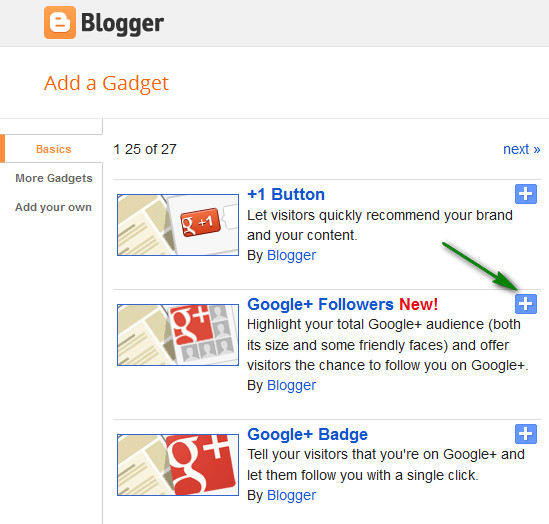
- After Adding click on save. You Are Done!
Hope you enjoy adding this new Google+ Follower box. Thanks and happy blogging.
Add A New Widget Container Below Header
Go to link download
Monday, August 22, 2016
Usb Tv Box Utv332 Usb
Usb Tv Box Utv332 Usb
Software compatible with usb tv box utv332 usb for Windows. Its safe, uploaded from tested source and passed AVG scan!
Info:
File: usb_tv_box_utv332_usb.zip
Driver version: 1.4.3
File size: 2 843 KB
Operation System: Windows
Upload source: original install disk
Go to link download
Subscribe to:
Posts (Atom)