Showing posts with label sidebar. Show all posts
Showing posts with label sidebar. Show all posts
Tuesday, September 13, 2016
Add Author Box with Rotator Image Effects in Blogger Sidebar or Footer
Add Author Box with Rotator Image Effects in Blogger Sidebar or Footer

how to Add Author Box with Rotator Image
Effects in Blogger Sidebaror Footer.
This author box contains rotator image effect
that means when your mouse cursor come on
image then it will rotate. I have tried to bring
little variety I include colored border your can
easily change color of border and other things.
This widgets Have great css effect.
How can you Add Author Box in bloggers blog?
- Log in to your blogger account.
- Click on blog title in which you want to add This Author box.
- Go to layout and then click on Add a Gadget.
- Select "HTML/JavaScript" Widget.
- Copy the below code and paste in it then Hit save.
Live Demo
<style>.KHprofileBorder {margin:5px auto;padding:10px;width:auto;
border-radius:5px;border: 2px #3322dd
solid;min-height:125px;
width:275px;}
#KHprofile{border:2px solid #888;
margin:2px 5px 0px 5px; padding:2px;
}
#KHprofile:hover {border:2px solid #ccc;cursor:pointer;
}
.KHprofileopacity {opacity: 0.5;margin-left: 50px;
-moz-transition: all 0.5s ease-out;
-o-transition:
all 0.5s ease-out;
-webkit-transition: all 0.5s ease-out; -ms-transition:
all 0.5s ease-out;
transition: all 0.5s ease-out;
-moz-transform: rotate(8deg);
-o-transform: rotate(8deg);
-webkit-transform: rotate(8deg);
-ms-transform: rotate(7deg); transform: rotate(8deg);
sizingMethod=auto expand);
zoom: 1; }
.KHprofileopacity:hover {opacity: 1;
margin-left: 0px;-moz-transform:
rotate(0deg); -o-transform: rotate(0deg);
-webkit-transform: rotate(0deg);
-ms-transform: rotate(0deg);
transform: rotate(0deg);
sizingMethod=auto expand);
zoom: 1;
-moz-box-shadow: 1px 1px 4px #000;
-webkit-box-shadow: 2px 2px 8px #000;
box-shadow: 2px 2px 8px #000;} </style>
<div class="KHprofileBorder">
<img class="KHprofileopacity" id="KHprofile" height=65
src="http://3.bp.blogspot.com/-61Gvbm5glB8/
UPpeVQAMZ1I/AAAAAAAAADM/oAOmgWv2GLI/s1600
/429379_242610719163393_2098735386_n.jpg "
width=50 align="left"/>Im
<a rel="me" href=https://plus.google.com
/u/0/116054827022382240041/
title="Shakeel Asghar" target="_blank"> Shakeel Asghar
</a>from Lahore Pakistan. Founder of
<a href="http://kutebkhana.blogspot.com/">KutebKhana</a>
I love to blogging and
sharing tips and tricks with my readers.
I
am a Part time blogger.
Design Blogger template,
Web Developing and Designing.>>><a style="color:red;
"href="http://kutebkhana.blogspot.com/p/blog-
page.html " target="_blank">Read More »</a>
</div></div>
Customization!
- Change 116054827022382240041
with your G+ ID and write your own information.
- Change http://kutebkhana.blogspot.com/p/blog-page.html
link with your About Us Page.
- Change http://3.bp.blogspot.com/-61Gvbm5glB8
/UPpeVQAMZ1I/AAAAAAAAADM/oAOmgWv2GLI/s1600
/429379_242610719163393_2098735386_n.jpg
with your Image link. - If you want to change height and width of
width then simply change for
height
125px For width 275px.
Enjoy You Are Done!
Go to link download

Wednesday, August 24, 2016
How To Add Google Followers Box In Blogger Sidebar Or footer
How To Add Google Followers Box In Blogger Sidebar Or footer

But This useful widget increases your Google+ followers and connects your viewers through social media.
CSS3 keyboard like text effect in blogger
How to add Google+ Follower Box in BlogSpot?
- Log in to your blogger account.
- Click on blog title in which you want to add This Google+ followers Box.
- Go to layout and then click on Add a Gadget.
- A Pop-up box will Appear, click on Google+ Follower. See in the screen Shot Below
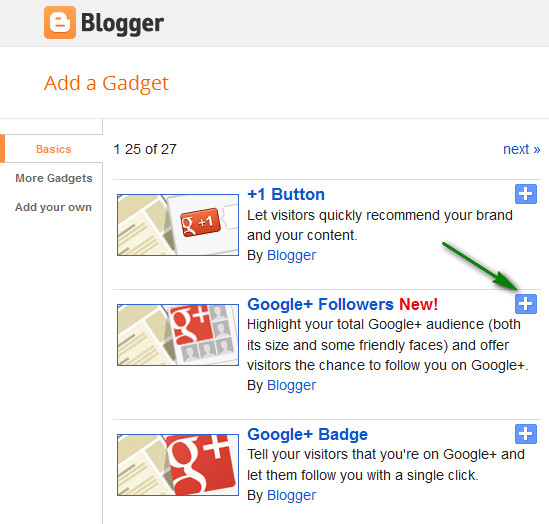
- After Adding click on save. You Are Done!
Hope you enjoy adding this new Google+ Follower box. Thanks and happy blogging.
Add A New Widget Container Below Header
Go to link download
Sunday, August 7, 2016
Make Blogger Sidebar Fixed Sticky That Scrolls with You!
Make Blogger Sidebar Fixed Sticky That Scrolls with You!

You can arrange your blogger sidebar in several ways. Here I will show you some way of displaying sidebar as like fixed, sticky, animating. So lets see some example!
- Fixed Sidebar– with only CSS [See Example]
- jQuery Sticky Sidebar that Scrolls with Visitor! [See Example]
- jQuery Sticky Widget (only a specific widget will be Scroll ) [
This page is a example!, Sticky Widget is almost same as Sticky Sidebar, there whole sidebar stick around and here only a single widget stay sticky.]
Go to link download
Subscribe to:
Posts (Atom)