Showing posts with label make. Show all posts
Showing posts with label make. Show all posts
Wednesday, December 14, 2016
How can you make your browser password Protecting
How can you make your browser password Protecting
If you are scared from anyone who can use your browser and delete your important history so doesn’t worry here is the solution you can protect your Google chrome browser with password.
But before protecting your browser please carefully read password and keeps in your mind.Well, the whole process is very easy and simple.
You can do it all the way through a useful Google chrome extension.
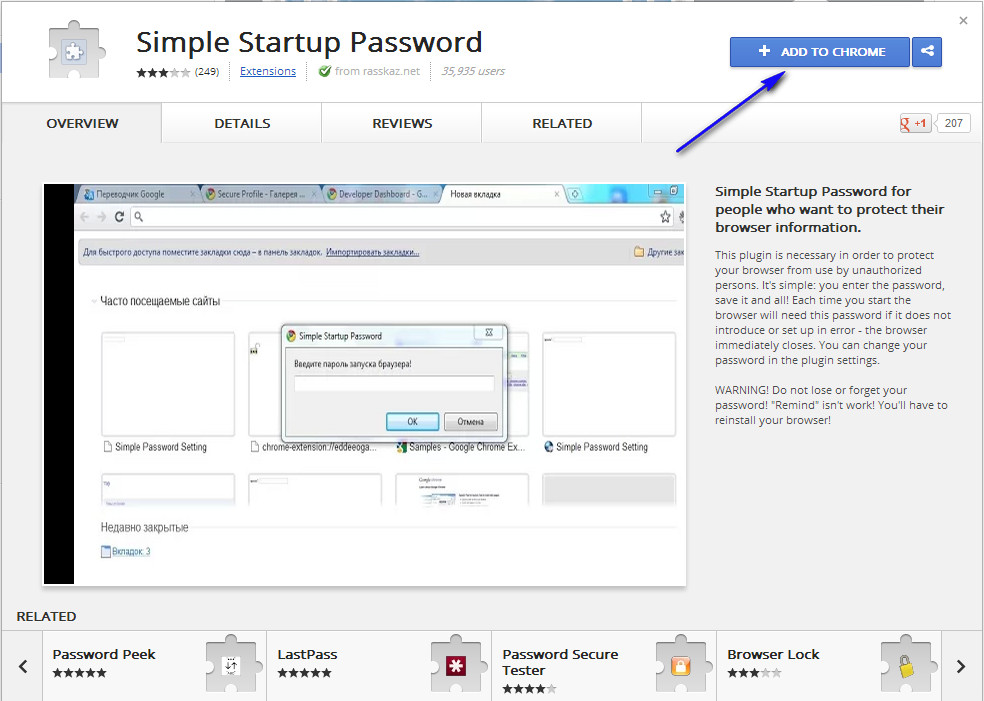
The name of this extension is Simple Startup Password. Open up Google chrome and visit this chrome extensionsdownloading page .A new page will be appearing and now click on “Add to Chrome “. After it, Chrome will demand
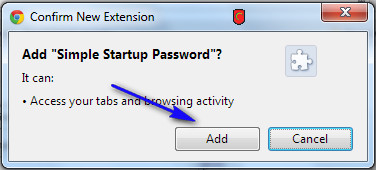
confirmation. Simply click on “Add “. You can see in the screenshots.
confirmation. Simply click on “Add “. You can see in the screenshots.
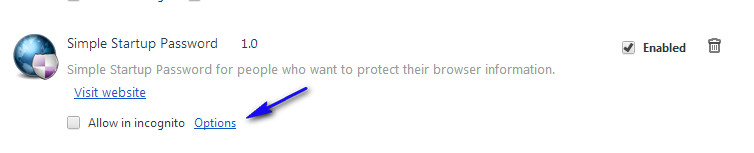
- Now visit the Extension page and Click on Option.
- When you click on it a new window open like this!
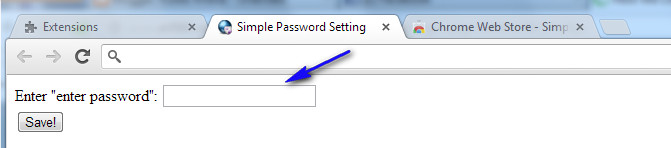
- So in this box write carefully password and keep in your mind its use when you open your browser.
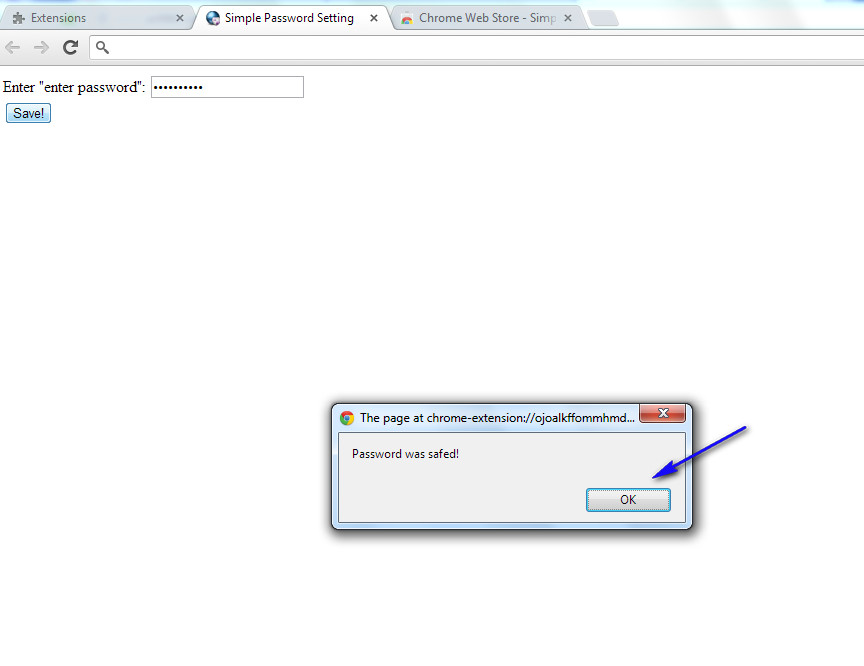
- And then click on OK for check the result reopen your browser.
If you have some problem watch this tutorial.
Go to link download

Sunday, December 11, 2016
How to make Desktop 3D from BumpTop software
How to make Desktop 3D from BumpTop software

his idea. The 1.0 version was released on April 8, 2009, along with a fully featured pro version as a paid upgrade. On April 30, 2010 the author announced that BumpTop was being discontinued and that they were taking the software "in an exciting new direction." Two days later, it was announced that the company had been acquired by Google. On January 5, 2011, Google released a sneak preview video of Android 3.0 Honeycomb showing a 3D desktop with features purportedly taken from BumpTop.
In BumpTop, documents are represented as three-dimensional boxes lying on a virtual desk. The user can position the boxes on the desk using the stylus or mouse. Extensive use of physics effects like bumping and tossing is applied to documents when they interact, for a more realistic experience. Boxes can be stacked with well-defined gestures. Multiple selection is performed by means of a LassoMenu, which fluidly combines in one stroke the act of lasso selection and action invocation via pie menus. BumpTop currently supports Windows XP, Vista , and 7, and a version for Mac OS X was released into private beta on January 18, 2010. The Mac edition omits the pie menu in favor of a more normal selection menu.
The software installer and the application phone home. While the download page on the official website does state: "Internet connection required for activation",this may not appear in other sources such as Cnet. There is no explicit dialog box asking the user to confirm this connection at the time it is required.
BumpTop automatically updates to the latest version.
Multi-Touch
With the release of BumpTop 1.2 on October 9, 2009, multi-touch support was added for Windows 7. It added 14 new gestures to the system that used multiple touches on the screen. One such gesture is “scrunching” your hand to pull files into a pile. Just like the regular version of BumpTop, the extensive use of physics is applied to these multi-touch gestures. Multi-touch support has since been added to Mac OS X as well.
Multi-touch support is currently only available in the Pro version of the software.
BumpTop Inside
On August 18, 2009, BumpTop announced their new “BumpTop Inside” program. Partnering with HIS, PowerColor, and SAPPHIRE, a free copy of BumpTop will be included with their graphics cards. The reasoning behind the partnership was to allow BumpTop to be spread to more customers, as well as allowing BumpTop to use the power of the newly bought graphics card. “BumpTop creates a brand new user experience for computer desktops,” said Ted Chen, CEO of TUL Corporation. “We are excited to add this innovative application into our graphics solution. Backed by the power of PowerColor graphics, BumpTop will make the user experience more vivid and change the way the traditional computer desktop is used.”
Video Tutorial:

Go to link download
Monday, October 31, 2016
How to make CSS3 keyboard like text effect in blogger And Website Post
How to make CSS3 keyboard like text effect in blogger And Website Post
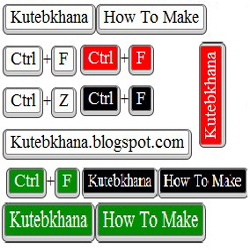
How can you add keyboard keys effect in your blog post?
- Log in to your blogger account.
- Click on blog title in which you want to add This Keyboard Like Text Effect
- Go to Template and then click on "Edit HTML" Check Expand Widget Box..
- Now Find bellows code Using Ctrl+F Function.
]]></b:skin>
- Paste bellow CSS Code just above this ]]></b:skin>
Code for White color Keyboard Keys
KKW{
border:1px solid gray;
Background: #ffffff;
font-size:1.2em;
box-shadow:1px 0 1px 0 #eee, 0 2px 0 2px #ccc, 0 2px 0 3px #444;
-webkit-border-radius:3px;
-moz-border-radius:3px;
border-radius:3px;
margin:2px 3px;
padding:1px 5px;
}
Code for Black color Keyboard Keys
KKB{
border:1px solid gray;
Background: #000;
font-size:1.2em;
box-shadow:1px 0 1px 0 #eee, 0 2px 0 2px #ccc, 0 2px 0 3px #444;
Color:fff;
-webkit-border-radius:3px;
-moz-border-radius:3px;
border-radius:3px;
margin:2px 3px;
padding:1px 5px;
}
Code for Red color Keyboard Keys
KKR{
border:1px solid gray;
Background: #FF0000;
font-size:1.2em;
box-shadow:1px 0 1px 0 #eee, 0 2px 0 2px #ccc, 0 2px 0 3px #444;
Color:fff;
-webkit-border-radius:3px;
-moz-border-radius:3px;
border-radius:3px;
margin:2px 3px;
padding:1px 5px;
}
Code for Green color Keyboard Keys
KKG{
border:1px solid gray;
Background: #008E00;
font-size:1.2em;
box-shadow:1px 0 1px 0 #eee, 0 2px 0 2px #ccc, 0 2px 0 3px #444;
Color:fff;
-webkit-border-radius:3px;
-moz-border-radius:3px;
border-radius:3px;
margin:2px 3px;
padding:1px 5px;
}
Settings!
You Can Change highlighted code for change your keyboard background color. (Choose color From here)Using in your blog post and pages
Please replace Write Your Word Here With Your Word!For Black:
<KKB> Write Your Word Here </KKB>
For White:
<KKW> Write Your Word Here </KKW>
For red:
<KKR> Write Your Word Here </KKR>
For Green:
<KKG> Write Your Word Here </KKG>
If you have any Kind of questions about this post, please lave a comments bellow.
Do not forget to share this Post with your friends!
Go to link download
Saturday, September 24, 2016
How to make money online from Bangladesh
How to make money online from Bangladesh

Have you ever tried to know that How to make money online at home from Bangladesh ? Most of online dwellers used this. I think, you have used too! Or, you have the expectation in your deep mind. However, It is really tough for a newbie to find out real income opportunity from online for first time. Most of time and most of newbies are fall in front of cheater. The online cheater is not only a cheater but also an educator cheater who is more harmful than an uneducated cheater. For this reason, PTC, HYIP, GPT and others false ways have been generated by them.
If you really want to know and earn from online, you have to be strong enough in some cases. What are those ?
Go to link download
Sunday, August 7, 2016
Make Blogger Sidebar Fixed Sticky That Scrolls with You!
Make Blogger Sidebar Fixed Sticky That Scrolls with You!

You can arrange your blogger sidebar in several ways. Here I will show you some way of displaying sidebar as like fixed, sticky, animating. So lets see some example!
- Fixed Sidebar– with only CSS [See Example]
- jQuery Sticky Sidebar that Scrolls with Visitor! [See Example]
- jQuery Sticky Widget (only a specific widget will be Scroll ) [
This page is a example!, Sticky Widget is almost same as Sticky Sidebar, there whole sidebar stick around and here only a single widget stay sticky.]
Go to link download
Saturday, August 6, 2016
Make Money Online
Make Money Online

There are too many ways to earn money online. For ezamle forex trading and other methods like Advertising programs and referral programs. You can also earn money from your website by advertising programms and other ways. I am listing some ways from which u can make money online easily from internet.
1. Google Adsense.
Google adsense is very good and profitable program. It pays it publishers from check and other methods.
2. Clixsence.
It is another method but it is not better than Adssense. But u can also earn money through it
3. Adf.ly
Adf.ly is also very profitable program for making money online. It pays 5$ for every 10000 visitors (clicks)
There are also other methods for making money online. But i think adsense is one of the best way for making money online.
Go to link download
Subscribe to:
Posts (Atom)